Google Merchant Center Integration
Publish your product feed directly to Google Merchant Center. Keep your search results and Shopping ads always up to date from a single source of truth.
PIMInto provides automatic feed generation in Google’s required format and validation warnings before publishing.
With PIMInto you can catch your missing required fields and enrch your data for maximum results.
Syncing to Google Merchant Center requires that you create a View using a Google Merchant Center Template and map your fields to the fields required by Google Mercant Center.
After you have created a View and mapped your fields you can then create a Feed and Sync Task.
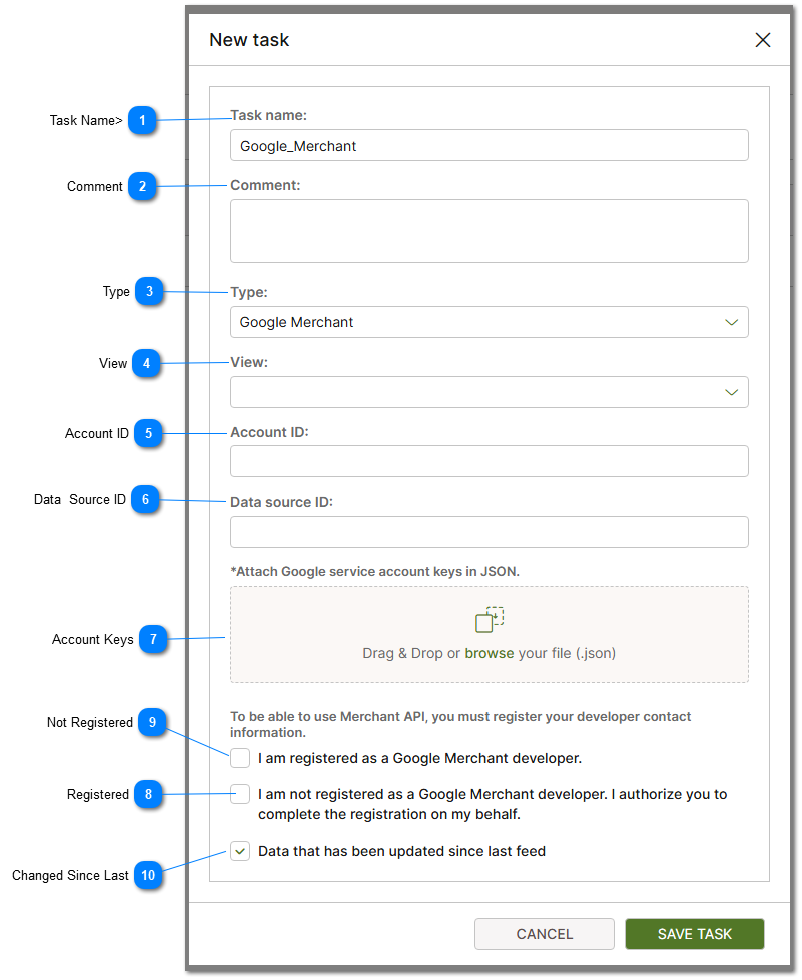
 Task Name> Provide a Generic Task name. Cannot contain spaces. |


 Type The type of feed. In this case select Google Merchant Center from the list of available types. |
 View Views are used to map PIM data to specific field names used by 3rd party eCommerce providers. Since you are creating a feed to sync to a Google Merchant Center you must select a template that maps the fields required. For more information on views and view templates please see how to Create PIM View help topic. |
 Account ID The Google Merchant Center Account ID Value is provided by Google Merchant Center. This value must be provided in order for the feed and sync to function properly. |
 Data Source ID The Data Source ID Value is provided by Google Merchant Center. This value must be provided in order for the feed and sync to function properly. |
 Account Keys The file containing your account keys is provided by Google Merchant Center. This file must be provided in order for the feed and sync to function properly. |
 Registered Check this checkbox if you are already registered as as Google Merchant Center Merchant. |


