How to Bulk Add Advanced Attributes in PIM
The Add attribute dialog window provides the ability to add bulk add attributes to the Product Information Management System, or add multiple attributes without having to click the "Add Attribute" icon each tim you wan to add an attribute. The dialog box below demonstrates how to add three attributes of type "number" using one "add attribute" dialog.
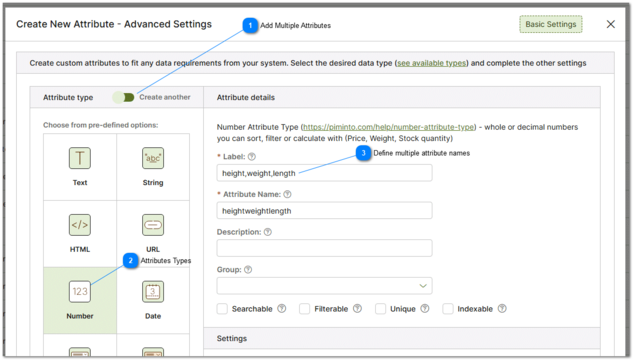
 Add Multiple Attributes The "add multiple attributes toggle" will keep the add attributes dialog open after creating each attribute. this facilitates adding multiple attributes to the PIM. |



Once an attribute type has been selected the properties for the attribute must be defined. An explanation of each attributes properties and their impact on the PIM and product data have been defined in a help topic for each attribute type. Common properties es include the attributes label, the attribute name, description and group.
For more information about the properties that can be defined for each attribute please refer to the help topics below:
To avoid common mistakes when defining attributes please see the following help topics: