Using PIMInto Skill with AI
To use the PIMInto skill with AI you must have a paid Premium plan or better. Download the latest PIMInto PIM skill file and add it to your AI. Below are instructions for adding the skill to Anthropic's "Claude.ai" and to "ChatGPT.ai" If you use a different AI you can ask that AI how to import a skill and you will be provided with specific instructions.
Add IMInto PIM Skill to ChatGPT
1. Open ChatGPT Settings.
2. Look for Skills or a skill-management option.
3. If an Upload or Add Skill option is available, select it.
4. Choose your .md file and follow the installation prompts.
Important: I can't confirm that direct custom-skill installation is available in your current ChatGPT interface. The Plugins directory is not necessarily the same as a custom skill installer.
Add A Skill to Claude
Step 1
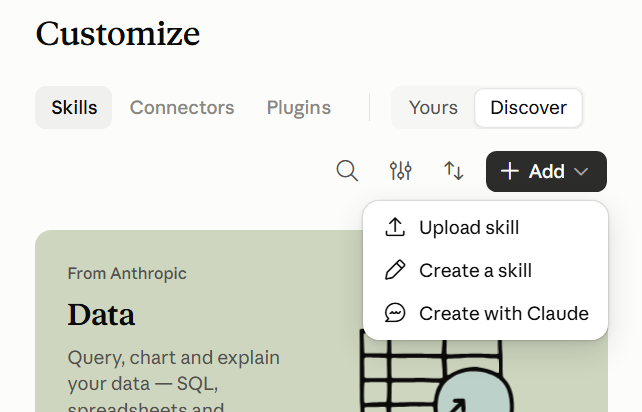
Download the latest PIMInto Skill file and upload it to Clause by first selecting "Customize" from the Claude Menu. Then Select "Skills" and "Upload" to upload the skill file.
Step 2
Additionally you MUST grant claude explicit rights to access your PIM instance by opening "Settings" and navigating to "Additional Allowed Domains" and adding your pim instance URL to the allowed domains list.

Step 3
In the natural language instructions provided to clayse you must tell claude to use the PIMInto Skill by putting "/piminto" at the start of the conversation. Additionally you must tell claude that your PIM instance is "yourinstance.piminto.com" and that you API Key is "yourapikeyvalue" by replacing the italics text with values from your PIM configuration.