Validation
Once the import task is run, PIMInto will validate the import data with the import engine and attribute configuration for your specific PIM and the selected View. A data analysis will be performed and presented. If PIMInto import engine is confused or unable to map fields properly then you will have the option of selecting different destination fields, not importing specific attributes or canceling the import entirely.
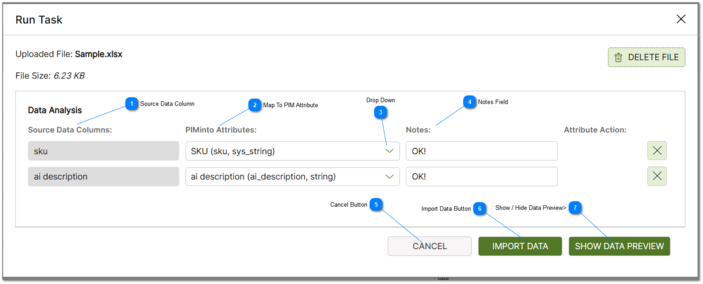
 Source Data Column These columns represent attributes or columns that are found in the source input file. |


 Drop Down Clicking the drop down control displays the list of available attribute fields for selection. |
 Notes Field Informational comments related to the import provided by the analysis engine. |
 Cancel Button Cancel the data import process and return to the Import task list. |
 Import Data Button Perform the actual data import. |