Woo Commerce
PIMinto serves as your source of truth, when your product data lives in WooCommerce.
With our integration, you can fetch all existing product information from your WooCommerce store into PIMinto, update it as needed, and then send the improved data back to WooCommerce — either on demand or on a scheduled sync.
This ensures your store stays accurate, consistent, and always up to date.
Syncing to WooCommerce requires that you create a View using a WooCommerce Template and map your fields to the fields required by WooCommerce.
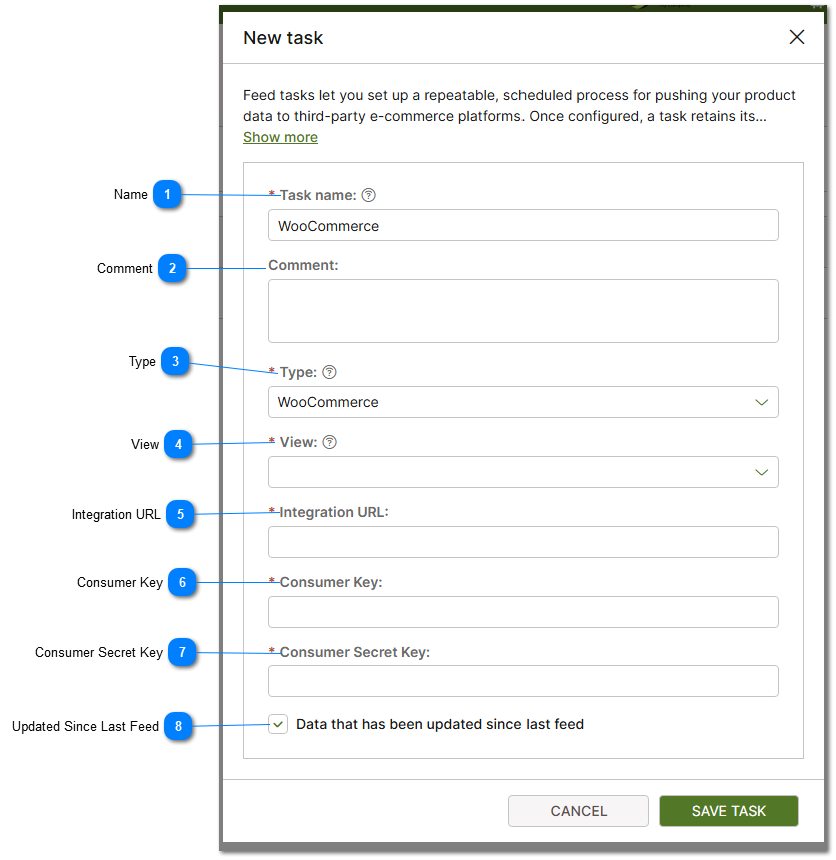
 Name Provide a Generic Task name. Cannot contain spaces. |


 Type The type of feed. In this case select Woo Commere from the list of available types. |
 View Views are used to map PIM data to specific field names used by 3rd party eCommerce providers. Since you are creating a feed to sync to a Woo Commerce store you must select a template that maps the fields required. For more information on views and view templates please see how to Create PIM View help topic. |
 Integration URL Provide the Integration URL. This value is obtained from Woo Commerce. |
 Consumer Key Provide the Consumer Key. This value is obtained from Woo Commerce. |
 Consumer Secret Key Provide the Consumer Secret Key. This value is obtained from Woo Commerce. |

