Brand Portal Management Interface
The Brand Portal Management Interface provides the ability to manage all aspects of the PIMInto PIM brand portal. This includes Creating, Editing and Deleting brand portals.
In order to properly render a data driven brand portal the PIM requires a minimum subset of product data. For more information please see the help topic Minimum Product Data Requirements.
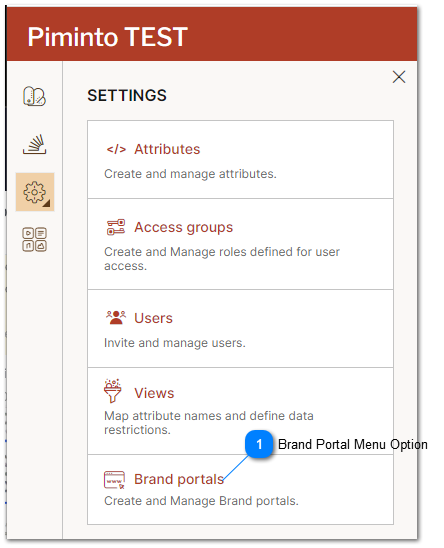
 Brand Portal Menu Option Click the brand portal management menu option to open the brand portal management interface to add and configure brand portals. |
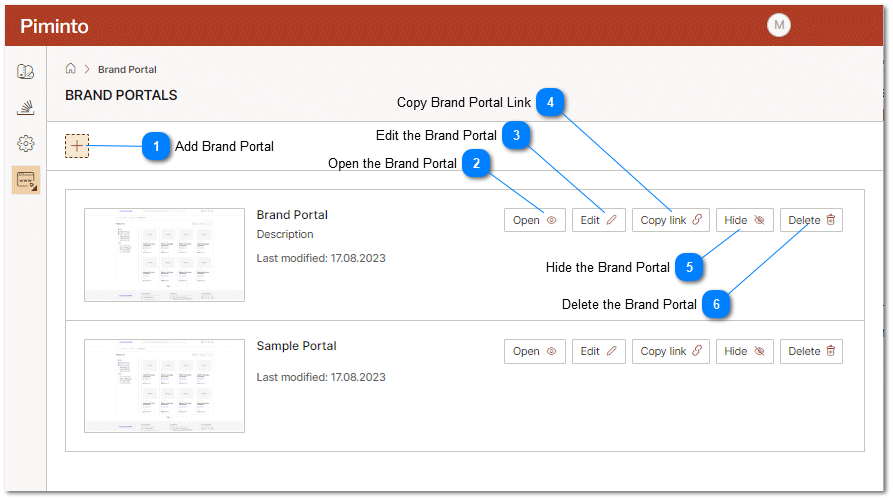
Add Brand Portal Opens the Add a brand portal settings and configuration interface allowing a new brand portal to be created and configured. |


 Edit the Brand Portal Open the brand portal's edit settings and configuration interface to view settings or make changes. |
 Copy Brand Portal Link Copies the external URL of the brand portal. This is the URL used by the general public to access and browse the brand portal. |
 Hide the Brand Portal Temporarily hide the brand portal. This temporarily prevents anyone from accessing the brand portal using the brand portal URL. |
 Delete the Brand Portal Permanently delete the brand portal and its related settings. This permanently prevents anyone from accessing the brand portal using the brand portal URL. |