PIM Dropdown Attribute Type
A dropdown attribute related to products in a Product Information Management System (PIM) refers to a type of attribute where the product information can be selected from a predefined list of options. These options are presented in a dropdown menu, hence the name.
Dropdown attributes are typically used when the information about a product falls within a specific set of defined values. This could be used, for example, to indicate the color of a product (with options like "red", "blue", "green"), the size of clothing (with options like "S", "M", "L", "XL"), or the material of an item (with options like "wood", "metal", "plastic").
This attribute type can help maintain consistency of data in the PIM by preventing free-text entries and ensuring the data entered aligns with the predefined options. Furthermore, they aid in product search and filtering, as they allow customers to select the exact specification they're looking for from the dropdown menu.
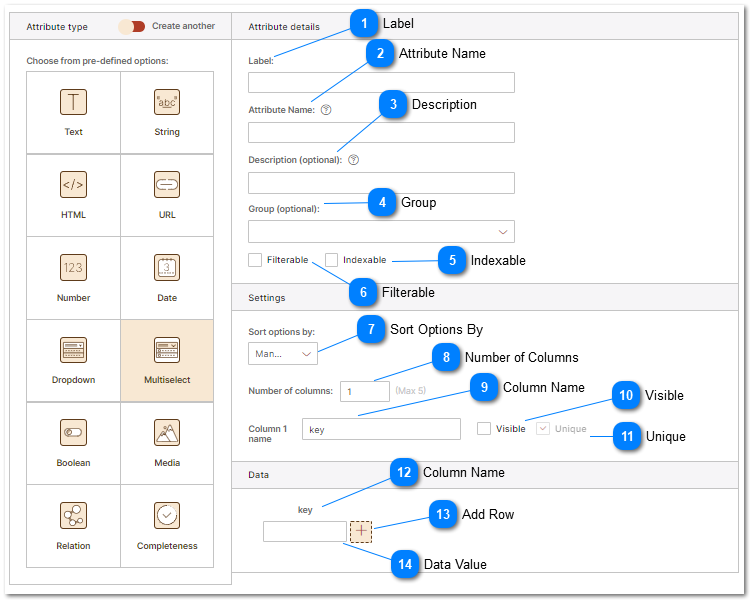
 Label Friendly display name for the attribute displayed in the PIM editing user interface. Additionally labels are consumed by the brand portal and are visible to users who browse product data via the brand portal. |
 Attribute Name |
 Description Helpful description of the purpose of the attribute stored in the PIM. Assists data entry personnel by proving information about what attribute data is stored in the PIM. 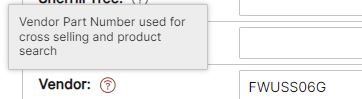 |
 Group Group provides multiple functions in the user interface, brand portals, connected channels, feeds and web sites. In the user interface Group allows attributes to be Grouped together for easy editing and display. The screenshot below demonstrates grouping of attributes with the "Group" Dimensions - Packaging" displayed for editing. All attributes that belong to the group are displayed together. Please refer to the Product Attribute Groups help topic for more information. For information on how groups are used by brand portals refer to the Brand Portals help topic. 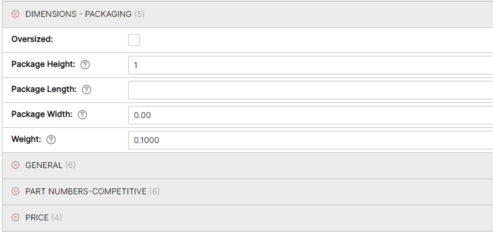 |


 Filterable Attributes that are filterable may be used to filter products by attribute in Categories. For more information about filterable attributes see the help topic on Product Categories. |
 Sort Options By Provides list sort order information to PIM editing interface and for use by external applications that use "Fast Data Serving" API endpoints. Proper list sorting provides a better data editor and eCommerce shopping and Brand Portal experience. |


 Column Name The Column Name is displayed in the data editing area above each column. |


 Data Value The Data Value is where you type the value that will be stored in the specified column for each row or selection in the dropdown. |