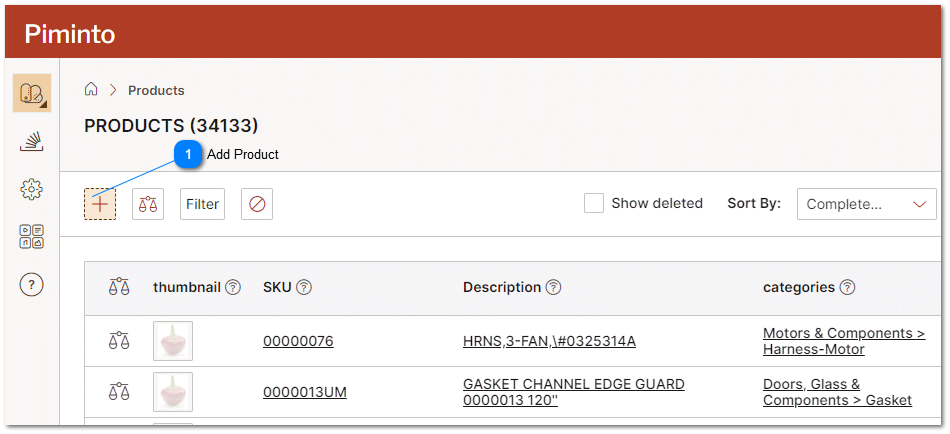
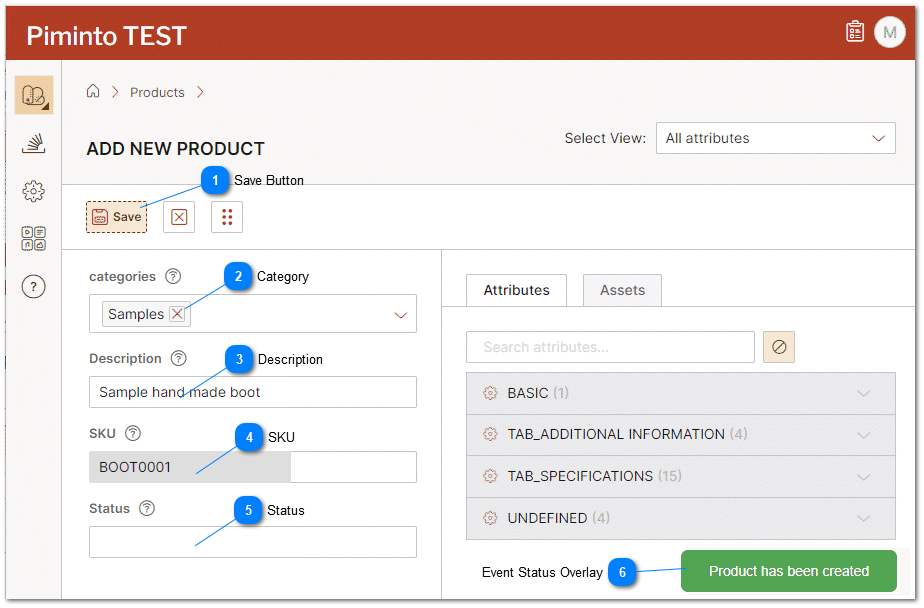
Add ProductClick on the "Add Product" or "Add SKU" icon to open the Product Detail Page in the user interface. Save ButtonOnce all information for the new SKU has been entered in the appropriate fields and attributes click on the "Save" button to save the SKU |
 CategorySelect one or more categories from the Category drop down. All SKU's must belong to a category.
The concept of categories is fundamental for organizing and classifying products. Categories act as a way to group related products together based on their characteristics, attributes, or purposes. However, there are situations where products may not be explicitly assigned to a specific category. Every product must belong to at least one category. If a user creates or imports a product but does not explicitly assign it to any category, the system will automatically assign the product to a default or catch-all category known as "Uncategorized." The "Uncategorized" category serves as a placeholder for products that lack a specific classification. It allows users to quickly identify products that have not been organized into specific categories, making it easier to find and manage these items. |
 DescriptionA "Product Title" or Description is the specific, descriptive name assigned to a product that distinctly identifies it in the product catalog and Product Information Management System. This title often includes key information such as brand, product type, unique features, or model number. In a PIM, product titles play a pivotal role in improving product discovery, both for internal management purposes and for customers searching online. An effective product title enhances SEO performance, ultimately boosting visibility on search engines and directly influencing customer engagement and conversion rates. The meticulous management of product titles within a PIM can significantly enhance a business's e-commerce success. |
 SKUSKU (Stock Keeping Unit) is a unique identifier assigned to each product. It is a critical attribute used for inventory management, tracking, and distinguishing products from one another. The SKU acts as a primary key, ensuring that each product in the system has a unique and non-repeating identifier. The SKU attribute is mandatory for every product in the system. When adding a new product or updating an existing one, users must provide a valid SKU value. This ensures that all products in the database have a SKU assigned to them, and no product can exist without this unique identifier. In addition to being a crucial attribute for inventory management, the uniqueness of SKUs prevents data duplication and ensures that products are accurately represented and tracked throughout the system. This is essential for running a successful e-commerce platform, retail operation, or any business that deals with multiple products and requires accurate inventory control. |
 Status status - "Status" refers to the current availability or life cycle state of a specific product in the inventory. This status can typically have one of three values in the Product Information Management System: Active, Inactive, or Deleted. "active" status means the product is currently available for sale and can be returned in the product listings, search results, channels or feeds. "inactive" status is used for products temporarily unavailable for sale but still exist within the system. These products are generally hidden from customer-facing platforms but remain accessible for potential future use. A "deleted" status indicates that the product has been permanently removed from the Product Information Management System (PIM) and is no longer available or relevant for management or data editing or reporting purposes. Effective management of product statuses in a PIM is crucial for maintaining accurate, up-to-date inventory data, which in turn influences sales strategies, customer experience, and overall e-commerce success. It's an integral part of product information management, ensuring that only relevant, current product data is presented to the customer. |
 Event Status OverlayIn the lower right corner of the user interface, an overlay message is strategically positioned to display the status of the most recent action taken. This message is color-coded to convey different levels of importance or to indicate if an error has occurred. The varying colors of the message serve as an intuitive guide, helping users quickly understand the outcome or significance of their actions, enhancing the overall user experience and efficiency of the interface. |
|