Schedule PIM Export
The Schedule tab on the Edit task window for export tasks allows export tasks to be scheduled to run in the future at a specific date and time, or to be executed as a recurring task. The task can be scheduled to send an the export file as an email attachment to up to multiple individual email addresses. The task can also be configured to post the export file to a specific external URL.
Please be aware that many email servers limit the attachment file size. We do not generally recommend emailing files or 10 or 20 megabytes as a general rule. Make sure that the recipient's email configuration allows them to receive the file attachment.
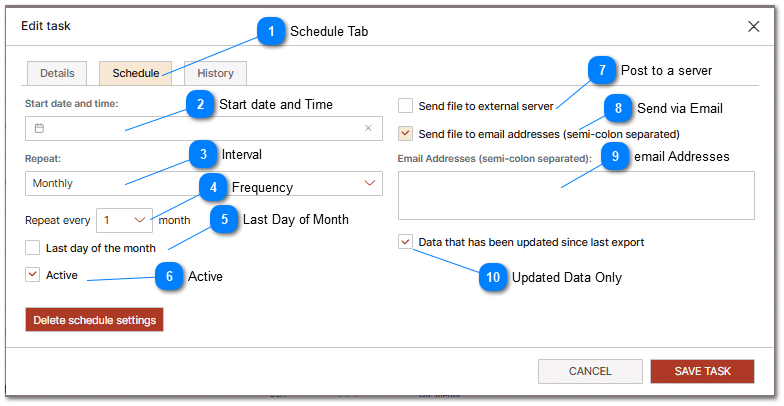
 Schedule Tab The Schedule tab contains the settings for scheduling a task to execute in the future or execute on a predefined schedule. |
 Start date and Time Select the date and time that the export should start. |
 Interval If the export should be repeated then select the interval. Options include: Daily, Weekly and Monthly. |
 Frequency To schedule the frequency of export select the appropriate frequency. |


 Active This option enables or disables the scheduling of the task. Only Active tasks will be executed.... |


 Send via Email Send the file as an attachment to up to multiple email recipients. |
 email Addresses Enter one or more email recipients here separated by a semi-colon. |

