Ecommerce Catalog Management: A Practical Guide
Author name: Mark James

Your product catalog can be the difference between sales and lost revenue. If data is messy, customers bounce. Below we break down ecommerce catalog management so you can turn chaos into advantage.
What Is Ecommerce Catalog Management?
At its core, ecommerce catalog management is the process of organizing, updating, and distributing product information across every sales channel you use. It covers SKU codes, category trees, attribute sets, images, and copy.
A catalog’s architecture is the data model that defines how SKUs, taxonomies, attributes, and relationships are stored. A clean model improves site crawlability and conversion rates, while a broken one creates duplicate pages and thin content that hurts SEO.
We see three usable steps: define a single source of truth, enrich the data for each channel, and push updates automatically. Teams that skip any of these steps end up with price errors, out‑of‑stock alerts, or listings that get suppressed.
Our pick, PIMInto, gives you a cloud‑based hub that stores every attribute, image, and variant in one place. It then syncs to Shopify, Amazon, Magento, and more without extra feed add‑ons. Small teams love the free tier because it lets them start without a big budget.
For a deeper dive on structuring your catalog, check out our ecommerce product catalog management guide. It walks you through mandatory attributes, naming rules, and role‑based permissions.
How the Ecommerce Catalog Data Lifecycle Works
The lifecycle starts when a new SKU lands in your master record. From there you enrich, publish, maintain, and eventually retire the product.
First, a product record is created with core fields , SKU, title, price, and a primary image. Next, enrichment adds detailed descriptions, SEO‑friendly copy, and extra media. When the data is ready, the system formats it for each channel and pushes it via API or feed.
After publishing, you must keep price, stock, and content current. Automated rules can flag stale data, but a human review still catches edge cases.

When a product is discontinued, the retire step removes it from every channel cleanly, avoiding orphan listings that confuse shoppers.
Catalog Management Across Ecommerce Channels
Different channels have different requirements. Amazon wants bullet‑point features and a browse‑node ID, while Shopify cares about clean URLs and variant limits.
Shopify’s own article notes that ecommerce sales are projected to grow in 2027, underscoring the need for a scalable approach (Shopify). A unified catalog lets you tweak one record and have the change flow everywhere.
Built‑in feed support is rare , only two of the 21 platforms we studied offered it natively. PIMInto includes feeds for Shopify, WooCommerce, Google Shopping, and Amazon out of the box, so you avoid costly add‑ons.
For a side‑by‑side comparison of product catalog software, see Best Product Catalog Software in 2026. It lists the key features you’ll need to weigh.
The Role of PIM in Ecommerce Catalog Management
A Product Information Management (PIM) system is the single source of truth for all product data. It stores, enriches, validates, and distributes information to every downstream system.
When you update a price in the PIM, the change instantly appears on your storefront, marketplace listings, and paid ads. That eliminates the “update‑once‑per‑channel” nightmare that slows teams.
PIMInto’s cloud platform adds AI‑driven enrichment, bulk‑edit tools, and built‑in channel feeds. Those features appear in only 5‑10 % of the market, .
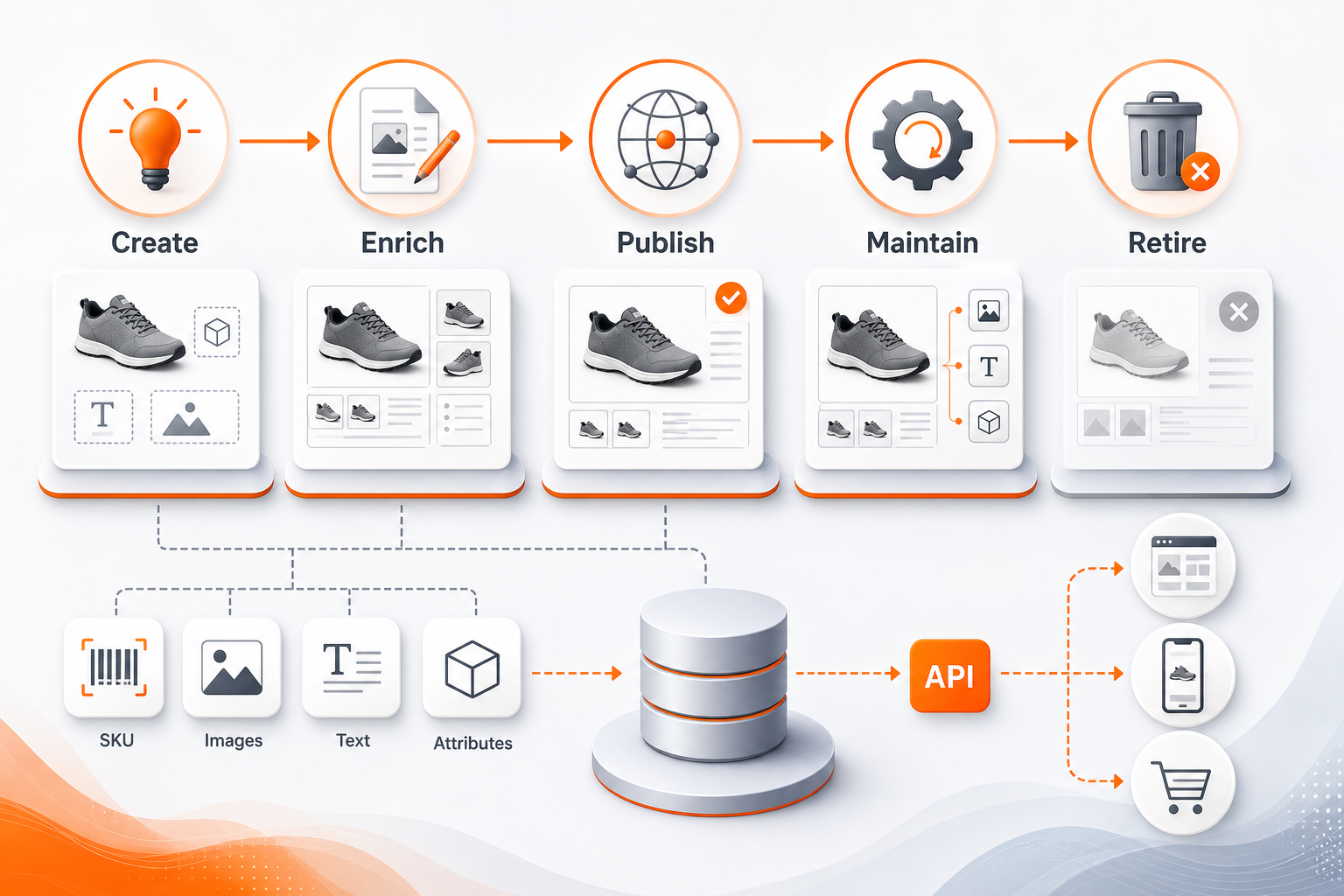
Because the PIM talks to ERP, DAM, and marketing tools via API, you keep data consistent across the whole organization. Teams can collaborate in real time, reducing the back‑and‑forth of spreadsheets.
Common Catalog Management Problems and Controls
Even a good PIM can suffer from data‑quality issues if you don’t set up controls.
Inaccurate information can be a deal-breaker for shoppers. If a shoe lacks size data, it won’t appear in filtered searches.
Validation rules catch format errors , for example, GTIN must be numeric. Range checks prevent absurd values like a 0.01‑gram laptop. Allowed‑value rules keep color names consistent, avoiding “navy” vs “midnight”.
Beyond deterministic checks, AI‑based semantic scoring can flag titles that don’t match the category or descriptions that sound generic. Records with low confidence are routed to a review queue for a human to fix.
We recommend a three‑layer pipeline: automated rules, AI confidence scores, and a manual review step for anything flagged as high‑risk.
For more on building a validation framework, read our PIM for catalog management guide. It shows how to define contracts with suppliers and set up automated quality scores.
FAQ
What is the first step to improve my catalog data?
The first step is to audit your current records and identify missing or inconsistent fields. A quick spreadsheet export lets you see where titles, images, or attributes are absent, then you can prioritize fixing the highest‑impact gaps.
How often should I update product information?
You should update any change as soon as it happens , price, stock, or description. Real‑time sync via a PIM ensures every channel reflects the latest data within minutes, preventing mismatched listings.
Can a free tier really handle a growing catalog?
Yes, PIMInto’s free tier supports unlimited SKUs and built‑in feeds, making it a solid start for small to medium teams. As you add more channels or need advanced workflow rules, you can upgrade without migrating data.
Why does bulk editing matter?
Bulk editing lets you change prices, attributes, or images for thousands of SKUs in one click. Without it, you’d spend hours manually editing each product, which slows time‑to‑market and raises error risk.
What role does AI play in catalog enrichment?
AI can draft titles, descriptions, and attribute values from a few keywords. Human editors then review the output, cutting the time to enrich a SKU from 30 minutes to about 5 minutes.
How do I prevent duplicate listings?
Use a unique identifier like SKU or GTIN for every product variant and enforce a rule that prevents duplicate IDs from entering the system. Validation at import time catches repeats before they go live.
Conclusion
Pick a PIM that gives you a single source of truth, built‑in feeds, and AI enrichment ,PIMInto checks all those boxes for SMBs. Start a free trial today and see how quickly you can clean up your catalog.
Modified on: 2026-08-07
Blogs you might like
-

Best PIM Software for Shopify in 2026
Shopify handles products well until the catalog outgrows it. Variants pile up, supplier files arrive in different formats, a second store needs the same products with different content, and spreadsheets become the real system of record. That is the p...
-

Jewelry Product Catalog Software: Managing Product Data, Line Sheets and B2B Catalogs
One engagement ring design can come in three metals, four center-stone weights and twelve ring sizes. Add natural and lab-grown versions, a wholesale price for boutiques and a separate price list for Europe, and a single design turns into hundreds of...
-

Beauty and Cosmetics Product Data Management: A PIM Guide for Brands
A lipstick launches in 20 shades. Each shade has its own barcode, swatch, product photo, shade description and stock status, and every retailer wants that information in a different spreadsheet. Six months later the brand adds a matte version and a m...
-

Food and Beverage Product Data Management: A Practical Guide for Brands and Distributors
A granola bar recipe changes: almonds replace cashews. The new label goes to print, but the allergen statement on your website, the spec sheet your distributor uses and the listing on an online grocery site still say "contains cashews." Nobody made a...
