Multichannel Ecommerce Software: A Practical Guide
Author name: Mark Chickering
A shopper finds your product on Amazon, checks the price in your Shopify store and buys it on Walmart. Behind that one purchase sit three listings, one pool of stock and a product description that has to match everywhere. Multichannel ecommerce software is the set of tools that publishes listings to several sales channels, syncs inventory, routes orders to fulfillment and keeps product information consistent across every storefront and marketplace.
Few sellers need every layer on day one. What you need depends on how many channels you run, how large your catalog is and how many people and partners work with your product data. With the right match, adding a channel becomes a mapping task. With the wrong one, every new marketplace adds another admin panel to update by hand.
What Is Multichannel Ecommerce Software?
Multichannel ecommerce means selling the same products through more than one channel: your own online store, marketplaces such as Amazon, eBay and Walmart, social shops, Google Shopping and B2B portals for dealers and distributors. Our guide to multichannel retailing covers the strategy side, from choosing channels to balancing them.
Without dedicated software, every channel runs as a separate system. You create each listing by hand, lower stock after every sale, copy orders into your shipping tool and fix a product description in five places when a spec changes. That is manageable with a dozen SKUs. With a few hundred products and three marketplaces, manual updates lead to overselling, price gaps between channels and listings suppressed for missing attributes.
The term covers several types of software, which is why lists of the "best multichannel ecommerce software" often compare tools that do very different jobs. Some are listing and inventory tools built for marketplace sellers. Others are order management systems designed around fulfillment. Feed management tools format product data for ads and shopping channels, and a product information management (PIM) system keeps the product information itself accurate before it reaches any channel. Some vendors bundle several of these functions into one platform; others specialize in one. That is also why the same products appear in searches for a multichannel ecommerce platform, a multichannel ecommerce solution or multichannel integration software: the labels overlap, but the jobs behind them do not. Before you compare vendors, work out which of these jobs you actually need done.
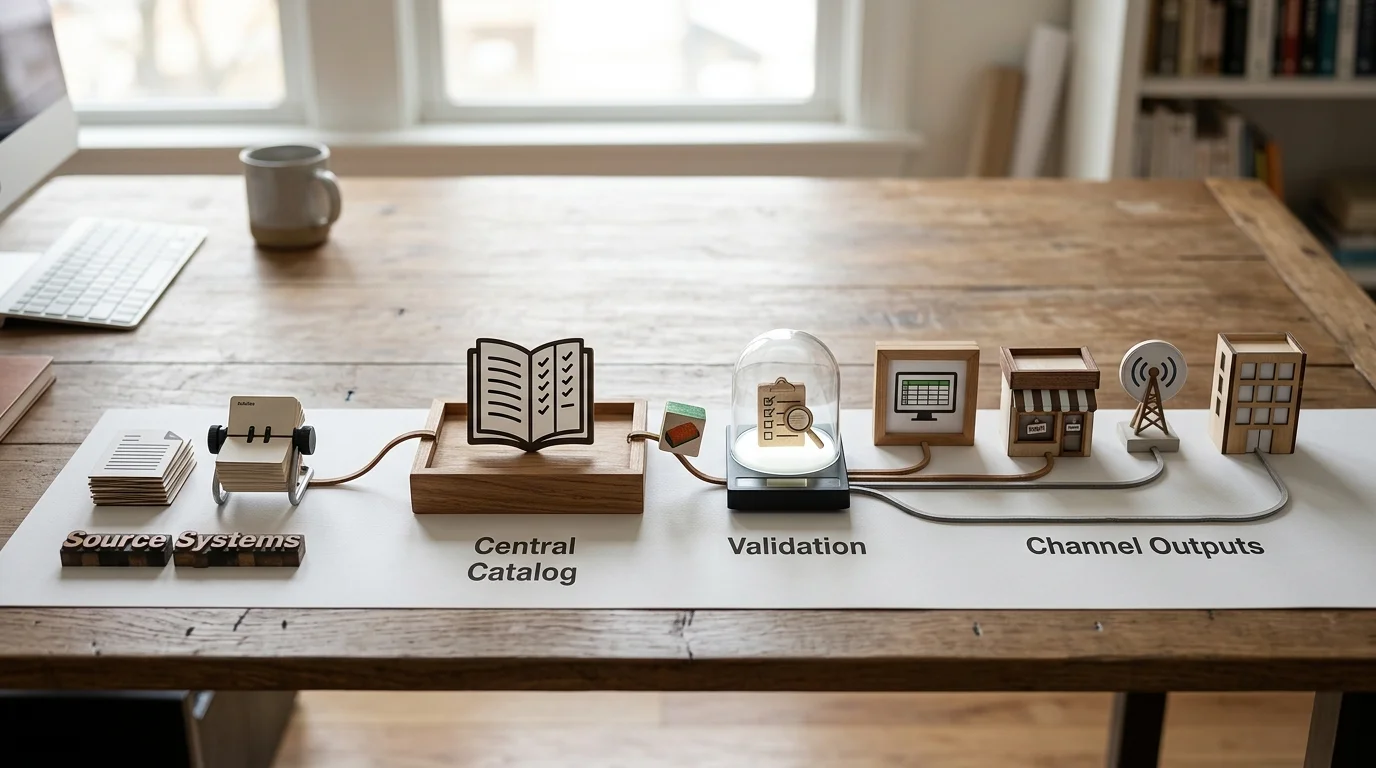
Core Functions of Multichannel Ecommerce Software
Whatever a vendor calls its product, the work falls into four functions. Most growing businesses end up using tools from more than one group.
Listing Management Across Channels
Listing management creates and updates product listings on each channel from one place. The tool maps your product fields to each marketplace's categories and required attributes, publishes new products and updates titles, prices and images when they change. A good listing tool also shows which listings were rejected and why, so you can add a missing attribute before it costs you sales.
Examples include marketplace apps such as Shopify Marketplace Connect, the channel managers built into ecommerce platforms, and dedicated multichannel listing platforms such as Rithum (formerly ChannelAdvisor). They differ mainly in how many marketplaces they support and how much control they give you over category mapping.
Feed management solves a similar task for advertising and shopping channels. Google Shopping, Meta, Microsoft Advertising and price comparison sites do not host listings in the same way marketplaces do. They read a product feed, a file or API stream with one row per product. Feed tools such as Feedonomics or GoDataFeed rewrite titles, fill missing attributes and filter products per network. They work best when the data they receive is already complete, because a feed tool can reformat information but cannot invent specs that were never entered.
Inventory Synchronization
Inventory sync keeps stock levels aligned on every channel. When a unit sells on eBay, the tool lowers the available quantity on Amazon, Walmart and your own store. Without it, two customers can buy the last unit on two channels, and you have to cancel one order. Marketplaces track seller cancellations, so repeated overselling can hurt your account standing.
Inventory tools also handle buffers and allocation rules. A buffer holds back a few units so a short sync delay does not cause overselling, and allocation rules decide how much stock each channel can see. Examples include Linnworks, Sellercloud and Zoho Inventory. In many companies the ERP remains the original source of stock numbers, and the inventory tool distributes them to channels.
Order Management
An order management system (OMS) collects orders from every channel into one queue, routes each order to the right warehouse, 3PL or dropship supplier, sends tracking numbers back to the marketplace and handles returns. For a seller with one warehouse, the order view inside a listing or inventory tool is often enough. Sellers with several warehouses, dropship partners or B2B accounts usually need a dedicated OMS or the order module of their ERP.
Many of the inventory tools above include order management, which is why the two functions are often sold together. When you compare them, look at routing rules, split shipments and how returns flow back into stock.
Product Information Management (PIM)
The first three functions move listings, stock and orders. Product information management deals with what the listing says: titles, descriptions, attributes, variants, specifications, images, documents and translations. A PIM system is the central record for that content. Teams enrich each product once, the PIM checks that the record is complete for every channel, and connectors or exports deliver the right version to each storefront, marketplace and partner.
Listing tools can publish data, but they rarely manage it well. They pass along whatever sits in your source, including missing attributes, inconsistent units and outdated images. A PIM becomes necessary when the catalog has many attributes, variants and documents, when several people edit product data, or when dealers and distributors need the same information your storefronts use.
Keep Product Data and Files in One Place
Specs, images and documents are only useful when they are attached to the right product and shared in the right format with every channel and partner.
One Platform or a Connected Stack?
Sellers usually choose between two approaches. An all-in-one multichannel ecommerce platform covers listings, inventory and orders in a single subscription. A connected stack combines specialized tools, each responsible for one job and linked through integrations.
An all-in-one platform is faster to launch and easier to learn, and there is one vendor to call when something breaks. The trade-off is depth. Product data management in these platforms is usually basic, and if one module does not fit your process, replacing it often means replacing everything.
A connected stack lets you pick the strongest tool for each job and swap one piece without rebuilding the rest. It needs more planning up front, because every type of data needs a clear owner.
This matters more than the choice of tools: each type of data should have exactly one system of record. When two systems can both edit the price or the product description, sync jobs overwrite each other and nobody knows which value is correct.
| Data | System of record | Examples |
|---|---|---|
| Attributes, variants, descriptions, translations | PIM | Specs, dimensions, marketing copy |
| Images, videos, manuals, CAD files | DAM, often part of the PIM | Product photos, spec sheets, install guides |
| Stock levels and purchasing | ERP or inventory tool | Available quantity, reorder points |
| Orders, fulfillment and returns | OMS or ecommerce platform | Order status, tracking numbers |
| Channel listings and ad feeds | Listing or feed tool | Marketplace categories, shopping feeds |
| Customer records | CRM or CDP | Contact history, segments |
Many businesses end up with a hybrid: the ecommerce platform handles orders and the storefront, a listing or inventory tool covers marketplaces, and a PIM supplies product content to both. The hybrid works well as long as the boundaries between tools stay clear and each integration moves data in one agreed direction.
Write down a map like the table above before you buy anything. It answers most integration questions in advance: which direction each sync runs, which system wins when values conflict and who on the team owns each field. It also shows quickly where a new tool would overlap with one you already pay for.
Which Setup Fits Your Business Stage
The right setup depends less on revenue than on three numbers: how many channels you sell on, how many SKUs you manage and who else edits or uses your product data.
One Store and One Marketplace
A brand with a Shopify or BigCommerce store and one marketplace can usually start with what its platform offers. Shopify Marketplace Connect syncs listings, inventory and orders with Amazon, eBay, Walmart and Target Plus from the Shopify admin, and BigCommerce offers a built-in channel manager for marketplaces and social channels. Product data stays in the store admin, which works while the catalog is small and one person maintains it.
You have outgrown this stage when fixing listing errors takes hours every week, when stock mistakes start causing cancellations or when a second person needs to edit the catalog.
Several Marketplaces and Shared Inventory
Once you sell on three or more channels from shared stock, a dedicated inventory and listing tool is usually worth its subscription. It keeps quantities aligned, applies buffers and brings all orders into one queue. If you advertise on Google Shopping, Meta or Microsoft, a feed management tool such as Feedonomics or GoDataFeed formats the product feed for each network and fixes common rejections.
At this stage product data often lives in three places: the store admin, the listing tool and a spreadsheet of supplier specs. Each holds a slightly different version of the same product. Typical symptoms are a spec corrected on the website but not on Amazon, images that differ between channels, and a new product that takes a week to go live because someone has to enter it in every system. These are the usual signs that the business needs a PIM.
Large Catalogs, B2B and Many Partners
Manufacturers, distributors and brands with thousands of SKUs face a different problem. Each product carries dozens of attributes, plus variants, technical documents and compliance data. Dealers, retailers and distributors need current information in their own formats, and marketing, product and sales teams edit records at the same time.
Here a PIM sits under the other tools as the source of product content. The ERP or inventory tool still owns stock, the OMS still owns orders, and the PIM supplies complete, approved product data to storefronts, feeds and partners. Brand portals let dealers download current specs and images themselves instead of emailing your team for the latest file.
How Major Channels Handle Product Data
Each channel stores products differently, and those differences decide how much mapping work a multichannel setup needs. The table summarizes the points that most often cause rejected listings or broken syncs.
| Channel | How it structures products | What to plan for |
|---|---|---|
| Shopify | Up to 2,048 variants per product; extra attributes stored in metafields | Map custom attributes to metafields and keep product IDs stable during sync |
| BigCommerce | Up to 600 SKUs and 200 custom fields per product | Decide which attributes become custom fields and which go to metafields |
| WooCommerce | Simple and variable products with attributes and variations, managed through the REST API | Plugins and themes can change how product data is stored and displayed |
| Wix | Up to 6 options and 1,000 variants per product, 50,000 products per store | Complex catalogs reach these limits sooner than on other platforms |
| Google Merchant Center | Required attributes include ID, title, description, link, image link, availability, price and brand | Price and availability must match the landing page; add a GTIN when the product has one |
| Amazon | Most new listings need a GS1-registered barcode such as a UPC or EAN | Barcodes are checked against the GS1 database; some private-label and generic products qualify for an exemption |
| eBay | Brand, MPN and GTIN are entered as item specifics when available | Variation listings need identifiers for each variation |
| Walmart | Item setup requires a valid product identifier such as a UPC or GTIN | Products without a barcode need an approved GTIN exemption |
Sources: Shopify, BigCommerce, Wix, Google Merchant Center, eBay.
Variants show how much these differences matter. A jacket in four colors and five sizes is one product with 20 variants in Shopify. On Amazon the same jacket becomes a parent listing with child items grouped by a variation theme such as size and color, and each child needs its own identifier. On Wix, a product with a seventh option, such as fit or length, will not fit the six-option limit and has to be split or restructured. A central product record that stores variants once and maps them per channel saves you from rebuilding the structure for every marketplace.
Requirements keep changing. Google, for example, will enforce a minimum image size of 500×500 pixels for product images from January 31, 2027. What each channel wants stays the same: complete identifiers, consistent attributes and images that meet its specs. Keeping that data in one place and mapping it per channel is far easier than fixing it separately in each admin panel.
Benefits and Common Pitfalls
Selling on several channels pays off when the operations behind it are under control. These are the gains sellers usually see and the mistakes that most often erase them.

Benefits
- More reach without more manual work. A new channel becomes a mapping and approval task instead of a project to retype the catalog.
- Less dependence on one marketplace. A fee increase, a policy change or a suspended account on one channel hurts less when revenue is spread across several.
- Fewer errors and returns. When specs, images and variants match everywhere, fewer customers order the wrong item and fewer listings get suppressed.
- Time back for the team. Staff stop copying data between systems and spend that time on assortment, pricing and content.
- Better data for decisions. When orders and listings from every channel are in one place, you can compare sales, returns and margin by channel and move stock or budget to where it performs.
Common Pitfalls
- Overselling from slow sync. Check how often stock updates on each channel and set buffers for fast-moving items.
- Product data drifting apart. If people edit titles and specs directly in each channel, versions split within weeks. Edit product content in one system only.
- Fees that eat the margin. Referral fees, fulfillment fees and marketplace advertising differ by channel. Calculate margin per channel and adjust prices or assortment where a channel loses money.
- Expanding too fast. Adding four marketplaces at once multiplies every data problem by four. Launch one channel, fix the errors it reveals, then add the next.
- One description for every channel. Marketplaces limit title length and favor different attributes in search, so copying the website title everywhere rarely works. Keep one master record and create channel versions of titles and descriptions from it.
- Two systems owning the same field. When the ERP and the ecommerce platform both edit prices, one will overwrite the other. Set the sync direction per field.
Multichannel vs. Omnichannel
The two terms are often used as synonyms, but they describe different goals. Multichannel means being present on several channels. Omnichannel means connecting those channels around one customer experience, so a shopper can start on one channel and finish on another.
| Aspect | Multichannel | Omnichannel |
|---|---|---|
| Focus | Reaching customers on more channels | One connected customer journey |
| How channels work | Each channel runs on its own | Channels share customer, stock and order data |
| Typical example | The same product sold on Amazon and in your online store | Buy online, pick up in store, return through any channel |
| Typical tools | Listing, inventory, order and product data tools | The same tools plus POS integration and a customer data platform |
Both models depend on the same foundation: product data that is identical on every channel. Most brands start multichannel and add omnichannel features as they open stores or build their own customer base. If physical stores are part of your plan, choose tools with open APIs now, so store data can join the same product records later.
How to Choose Multichannel Ecommerce Software
Whether a vendor sells a single multichannel ecommerce platform or one specialized piece of a stack, the evaluation works the same way. Start with the problem you need to solve. If you lose sales to overselling, look at inventory tools first. If listings get rejected or products look different on every channel, the gap is in product data. If fulfillment is slow, look at order management. Then ask every vendor the same questions:
- Which of our channels connect natively, and which need export files or custom integration work?
- How often does inventory sync, and can we set buffers per channel?
- Can the tool map our attributes and variants to each channel's categories and required fields?
- When a channel rejects a listing, do we see the exact error and the field to fix?
- Can we set which system owns each field and in which direction it syncs?
- How are images, documents and translations handled?
- What does pricing scale with: orders, SKUs, channels or users?
- What do onboarding, data migration and integration work cost?
- Is there an open API, and who maintains integrations when a channel changes its requirements?
Do not skip the last question. Marketplaces and ad networks update their specs several times a year. A vendor that maintains its connectors absorbs those changes. With a custom script, your team does.
Before a full rollout, run a pilot on one channel with a handful of typical products: a simple item, a product with many variants and one with heavy documentation. A pilot shows quickly whether the mapping holds up and how much manual cleanup your data needs.
Compare the total cost of ownership. Besides the subscription, per-order fees, connector fees, implementation, data cleanup and the staff time a tool saves or adds all belong in the calculation. A low subscription price means little if someone has to fix sync errors every day.
Not All PIM Systems Are Built the Same
If product data is your bottleneck, know what to look for before you compare vendors. This guide covers 15 criteria that separate tools that scale from ones that hold you back.
Build Your Multichannel Stack Around Clean Product Data
Multichannel selling works when each layer does its own job. Listing tools publish, inventory tools protect stock, order management gets parcels out the door, and product information management makes sure every channel shows the same accurate product. Start with the layer that hurts most today, and add the others as channels, SKUs and partners grow. Whatever you choose, decide early which system owns product content. It is the one layer every other tool reads from, and the hardest to fix after the catalog has spread across five admin panels.
PIMinto covers the product data layer of that stack. It combines PIM and digital asset management with approval workflows, AI-assisted enrichment and brand portals for dealers and distributors. Native connectors publish product data to Shopify, BigCommerce, WooCommerce, Wix and Google Shopping, and the team builds custom integrations with any ERP. Stock and orders stay in the systems built for them, while PIMinto keeps the product information they all depend on complete and consistent. Pricing is per company rather than per user, with a free Starter plan and paid plans from $300 per month, so adding team members or partners does not raise the bill.Give Every Channel the Same Accurate Product Data
Manage attributes, variants, images and documents in PIMinto and publish them to your storefronts and partners from one place.
Multichannel Ecommerce Software FAQ
Multichannel ecommerce software helps you sell the same products on several channels, such as your online store, marketplaces and shopping ads. Depending on the tool, it publishes listings, syncs inventory, collects orders or manages the product information each channel needs.
There is no single best tool, because the category covers different jobs. A store with one marketplace may only need its platform's built-in connector. A seller on several marketplaces needs inventory and order tools, and a business with a large or technical catalog needs a PIM underneath them. Choose by the problem you need to solve and test the tool on your own products.
Use an inventory tool that updates stock on every channel after each sale, check how often it syncs and set buffers for fast-moving products. Keep one system as the source of stock numbers, usually your ERP or inventory tool, so channels never compete over the same value.
Not always. A listing tool is enough for a small catalog managed by one person. A PIM becomes worth it when you have many attributes, variants or documents, several people editing product data, or partners who need the same information. The PIM then supplies clean data, and the listing tool publishes it.
Multichannel ecommerce means selling on several channels that run independently. Omnichannel connects those channels into one customer journey, with shared stock, orders and customer data, so a shopper can buy online and pick up or return in store.
Costs vary by type and scale. Listing and inventory tools often charge by order volume or number of channels, while PIM systems usually price by SKU count, users or company. Add implementation, connector fees and data cleanup to the subscription when you compare options. PIMinto prices per company, with a free Starter plan and paid plans from $300 per month.
Modified on: 2026-10-12
Blogs you might like
-

Jewelry Product Catalog Software: Managing Product Data, Line Sheets and B2B Catalogs
One engagement ring design can come in three metals, four center-stone weights and twelve ring sizes. Add natural and lab-grown versions, a wholesale price for boutiques and a separate price list for Europe, and a single design turns into hundreds of...
-

Beauty and Cosmetics Product Data Management: A PIM Guide for Brands
A lipstick launches in 20 shades. Each shade has its own barcode, swatch, product photo, shade description and stock status, and every retailer wants that information in a different spreadsheet. Six months later the brand adds a matte version and a m...
-

Food and Beverage Product Data Management: A Practical Guide for Brands and Distributors
A granola bar recipe changes: almonds replace cashews. The new label goes to print, but the allergen statement on your website, the spec sheet your distributor uses and the listing on an online grocery site still say "contains cashews." Nobody made a...
-
Automotive Aftermarket PIM Software Guide
An aftermarket brake rotor can fit dozens of vehicles, replace three older part numbers, ship in two package sizes and need a California warning label. Multiply that by 20,000 SKUs, and the spreadsheet that used to run your catalog starts sending cus...
