PIM SaaS: How Cloud PIM Works
Author name: Mark James
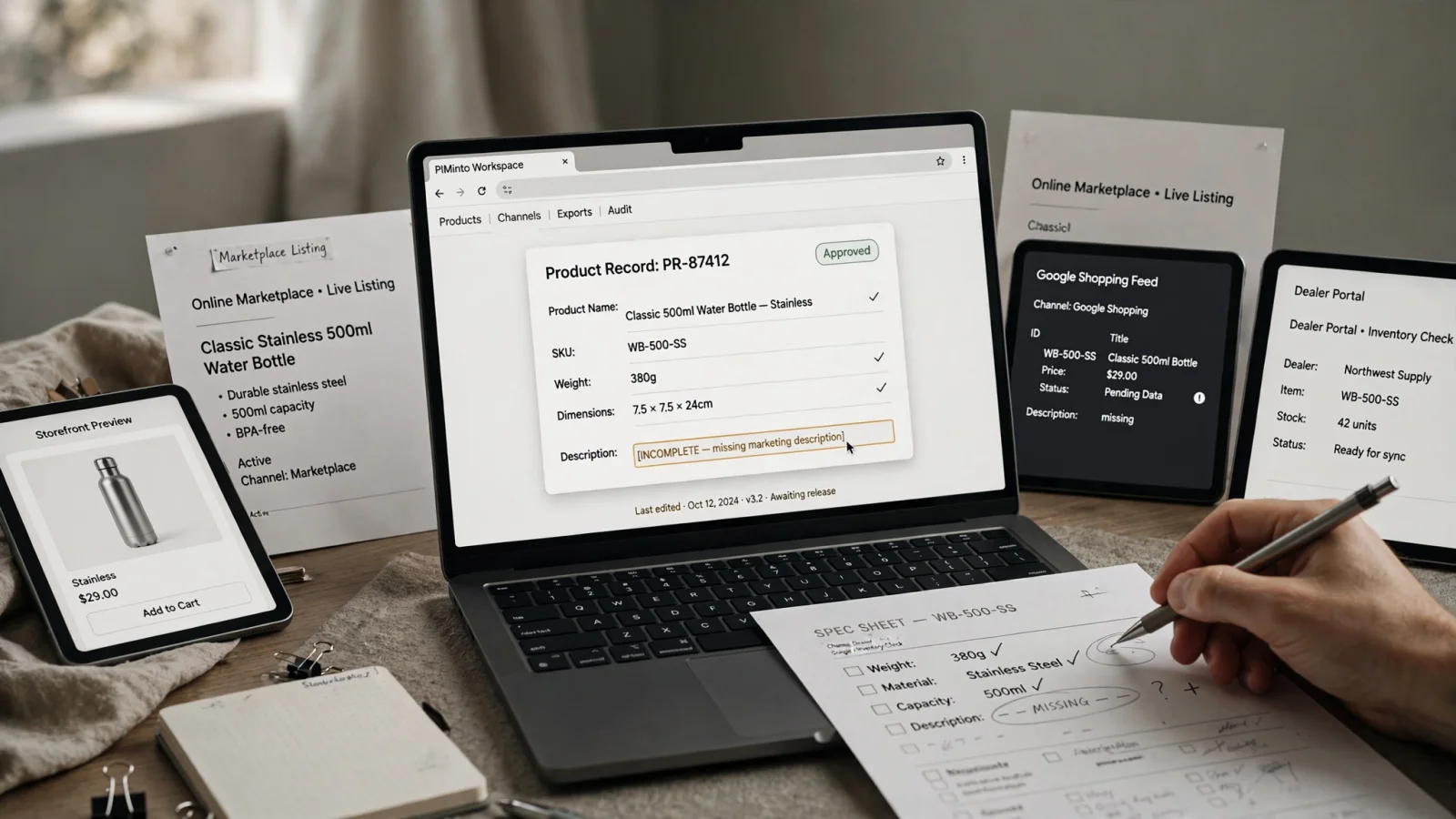
Product names, specifications, images, manuals, and supplier data often sit scattered across spreadsheets, ERP exports, storefronts, and shared folders. Every time your company adds a new sales channel, you create another place for that information to become outdated. Correcting a single product dimension across Shopify, a partner portal, and a printed catalog means logging into three different systems. A PIM SaaS platform centralizes this product information.
Keeping a single source of truth in the cloud lets you govern your catalog, update product records once, and distribute the correct data to every required endpoint.
Understanding The PIM SaaS Delivery Model
Product Information Management (PIM) organizes, enriches, and distributes your catalog data, while Software as a Service (SaaS) defines how that system is delivered. A PIM platform can run on your own servers, sit on a managed private cloud, or function as a SaaS application.
The NIST definition of cloud computing describes a model that enables on-demand network access to a shared pool of configurable computing resources, with minimal management effort or service-provider interaction.
PIMinto provides a practical example of this delivery model for growing brands. The platform combines structured product data storage with a dedicated Digital Asset Management (DAM) system, AI enrichment tools, and native commerce connectors. Because the tool operates in the cloud, you can log in from anywhere to map supplier data and push approved records directly to integrated storefronts. For a broader look at the software category before evaluating delivery methods, reading about how product information management works clarifies the core concepts and catalog structures.

How A Cloud Catalog Organizes Your Data
The value of a centralized catalog comes from the specific workflow it enforces. Instead of passing spreadsheets between departments, your team moves product records through a structured lifecycle from ingestion to publication.
Import And Normalize Source Data
Catalogs rarely originate in perfect condition. A PIM ingests data from supplier CSVs, legacy database exports, internal ERP systems, or live APIs. Because every supplier formats data differently, the platform helps you normalize inconsistent values. You map a supplier's "sz" column to the central "Size" attribute and standardize variable text like "in", "inch", and """ into a uniform "Inches" designation, establishing a clean baseline before enrichment begins.
Model And Enrich The Catalog
Once the raw data sits in the system, you structure the catalog. You organize individual SKUs into parent-child relationships, grouping different sizes and colors under a single parent product. Defining accessories, cross-sells, and compatibility mappings ensures customers see the correct replacement parts for a specific machine.
During the enrichment phase, you draft commercial descriptions, add translations for international markets, and fill in missing technical specifications. Many modern platforms offer AI assistants to accelerate this step. You can prompt the AI to generate a product description based on the technical specifications, review the output, and manually apply it to the record.
Validate, Publish, And Monitor
You cannot send the same unvalidated product records to every destination because each channel imposes strict rules. A custom wholesale portal expects a different data payload than a consumer-facing app.
These requirements matter in Google Merchant Center because accurate, correctly formatted product data is essential for successful ads and free listings. The Google Merchant Center's product data specification defines required attributes and formats for product IDs, titles, landing page links, and images. Missing or incorrect information can cause disapprovals, limited eligibility, incorrect displays, or prevent ads and free listings from showing on Google.
Core Components Managed By A PIM System
A capable PIM handles both the structured text data and the digital files associated with a product. Keeping these elements in the same system prevents situations where a storefront displays an updated description alongside an outdated lifestyle image.
Product Data, Variants, And Relationships
The software stores product titles, descriptions, technical specifications, dimensions, materials, weights, and localized values. It governs how different variants relate to a parent product. It also maps categorical data, allowing a single product to exist under "Summer Apparel" for marketing purposes and "Menswear" for storefront navigation.
Digital Assets And Governance
Digital assets include high-resolution product photography, lifestyle videos, material safety data sheets, user manuals, and installation guides. A platform like PIMinto combines PIM and DAM functionality so you connect these files directly to the relevant SKUs. Governance features control who can edit these records by employing role-based permissions, mandatory fields, and approval workflows to protect the catalog's integrity.
PIM, DAM, ERP, PLM, And MDM
Software categories overlap frequently, causing confusion during implementation. A PIM complements an ERP by taking over the customer-facing data rather than replacing the operational system entirely.
| System | Primary Responsibility |
|---|---|
| PIM (Product Information Management) | Governs customer-facing catalog structure, enrichment, and channel distribution. |
| DAM (Digital Asset Management) | Organizes digital files, media metadata, usage rights, and asset distribution. |
| ERP (Enterprise Resource Planning) | Manages operational, financial, transactional, and inventory data. |
| PLM (Product Lifecycle Management) | Controls engineering, design, development, and manufacturing information. |
| MDM (Master Data Management) | Enforces broad governance across multiple domains, including suppliers and customers. |
Defining ownership field by field prevents internal conflicts. Your ERP might own the stock level and wholesale price, while the PIM owns the marketing description, SEO tags, and product imagery.

Comparing SaaS PIM To Self-Hosted Architectures
Organizations must decide whether to run catalog software on their own servers or consume it as a service. Each deployment model offers distinct advantages regarding infrastructure control, maintenance, and setup speed.
Compare The Operating Model
Self-hosted architecture gives your IT department deep access to server configuration and code-level customizations, but it requires continuous maintenance. SaaS removes that hosting burden entirely.
| Evaluation Area | SaaS PIM | Self-Hosted PIM |
|---|---|---|
| Infrastructure | The vendor operates the servers, storage, and network. | The organization or its hosting partner operates the environment. |
| Updates | Maintained and automatically deployed by the software provider. | Scheduled, tested, and manually installed by internal IT or partners. |
| Access | Available through a web browser and vendor-managed APIs. | Dependent on the organization’s network configuration and VPN rules. |
| Customization | Configuration, supported extensions, and API development. | Full control over the source code, hosting environment, and server rules. |
| Upfront Effort | Bypasses server procurement, configuration, and software installation. | Requires provisioning hardware, configuring databases, and installing software. |
| Cost Structure | Predictable subscription based on SKUs, storage, or users. | Variable costs spanning software licenses, server hardware, and labor. |
Match Deployment To Your Requirements
SaaS generally suits companies seeking fast deployment and minimal infrastructure responsibility. You configure the software, import your data, and begin modeling products without waiting for hardware provisioning.
Self-hosting fits organizations with strict data-residency laws, unique internal security mandates, or heavy customization requirements that a standard API cannot accommodate. Cloud delivery reduces infrastructure work, but it does not eliminate implementation tasks. You still need to clean the source data, define governance policies, and build the integration mappings.
Best-Fit Use Cases For A Centralized Catalog
Translating software capabilities into actual business outcomes requires looking at specific roles. A centralized catalog solves different problems for different types of commerce organizations.
E-Commerce And Multichannel Retail
GS1 standards for product identification describe GTIN as a way for a company to uniquely identify its trade items, while Shopify's Admin API lets apps and integrations use GraphQL queries to access Shopify data.
Manufacturers And Distributors
B2B organizations face significant supplier data challenges. Distributors receive product information in varying formats and must combine it into a unified catalog for their dealers. A PIM handles supplier data normalization, complex compatibility relationships, and technical attributes. PIMinto features built-in brand portals, allowing B2B ecommerce operations to share approved product sheets and digital assets with external partners securely. Instead of answering email requests for high-resolution images, you can direct distributors to a self-service portal.
Limitations To Consider
Software does not automatically repair a broken catalog. If you import unstructured, duplicate-heavy spreadsheets into a cloud database, you end up with a messy cloud database.
AI-generated content also requires strict human oversight. While an AI assistant can quickly draft a description from a list of bullet points, it can also invent specifications or misinterpret technical features. PIMinto addresses this by enforcing a workflow where users review and approve AI outputs before applying them to the product record. Finally, a PIM does not guarantee better SEO or higher conversion rates; it provides the structured data that makes those outcomes possible.
Evaluating A PIM Platform Before Purchase
Evaluating software requires testing actual catalog scenarios against the vendor's capabilities and pricing structure. Commercial investigation should focus on how the platform handles your specific data complexities.
Catalog, Governance, And DAM
Start by reviewing the catalog model. The software needs to represent parent products, complex variants, product bundles, and cross-sell relationships. Test the attribute system by creating custom fields, applying required units of measure, and adding localized values for different markets.
Assess the data ingestion capabilities. A strong platform accepts spreadsheets, supplier files, and ERP exports without requiring a developer to format the incoming document perfectly. Look closely at governance and digital asset management to confirm you can assign field ownership, set up approval workflows, and link technical documents directly to specific variants.
Integrations, Validation, And Pricing
Connector coverage requires specific scrutiny. A vendor might list a Shopify integration, but you need to know if it supports metafields, handles image synchronization, and reports errors clearly.
Compare pricing by evaluating your total catalog requirements, paying attention to SKU capacity, storage limits, API rate limits, and output restrictions. PIMinto uses a published pricing model based primarily on SKU count and storage. As of September 2026, the structure includes a free Starter tier for up to 1,000 SKUs, an Essentials plan at $300 per month for up to 10,000 SKUs, Premium at $600 for up to 50,000 SKUs, and Super at $950 for up to 120,000 SKUs. Enterprise catalogs scale into a custom Extreme plan. Every tier provides unlimited users and published outputs, allowing brands to add sales representatives and channels without hitting paywalls. Reviewing a detailed product information management platform guide maps out these exact requirements before you begin a trial.
Run A Practical Test
Avoid relying on a generic feature tour. Asking the vendor to demonstrate a specific scenario exposes the platform's usability and error-reporting capabilities. Request that they:
- Import a messy supplier spreadsheet with inconsistent field names.
- Build a parent product with several variants from that data.
- Attach a product image and a technical PDF to the record.
- Use AI to improve a description, demonstrating the human approval step.
- Map the product to a specific channel feed.
- Intentionally remove a required field and observe how the system blocks publication.
- Update one specification and trace the change through to the output endpoint.
Frequently Asked Questions
Is PIM SaaS the same as cloud PIM?
These terms appear interchangeably in commerce software discussions, but you should verify the architecture. A modern platform offers true multi-tenant SaaS with API access and vendor-managed updates, rather than a legacy application hosted on a private cloud server.
Does a PIM replace an ERP?
No. Your ERP remains the system of record for operational data, inventory levels, purchasing, and financial reporting. The PIM acts as the central source for enriched, customer-facing product content and digital assets.
Does PIM software include a DAM?
Capabilities vary by vendor. Some PIM platforms integrate with separate DAM software, requiring you to purchase and maintain two systems. Others, like PIMinto, build DAM functionality directly into the platform so you manage structured data and digital files in the same workspace.
Can AI automatically manage my product information?
AI assists with drafting descriptions, translating content, and classifying products, but it should not run unattended. Technical, safety, and customer-facing data require human review before publication to prevent hallucinations or specification errors from reaching your storefront.
How do you migrate product data from spreadsheets?
Start by auditing the existing catalog to remove duplicates. Assign ownership for every field, deciding which system acts as the master record. Normalize your values, model your variant structures, and organize your digital assets. Run a pilot migration on a single, complex product category to validate your channel outputs before migrating the entire database.
Stop wrestling with scattered spreadsheets and outdated supplier files. Discover how PIMinto combines product data, digital assets, and AI enrichment into a single cloud platform. Explore PIMinto today and start your free catalog migration.
Modified on: 2026-09-17
Blogs you might like
-

Bulk Import Products to Shopify: Step-by-Step
Adding products one at a time works for a handful of items and turns into hours of copy-paste for a real catalog. Shopify lets you bulk import or bulk upload products with a CSV file, and for larger or recurring catalogs there are apps, the Admin API...
-

Best PIM Software for Shopify in 2026
Shopify handles products well until the catalog outgrows it. Variants pile up, supplier files arrive in different formats, a second store needs the same products with different content, and spreadsheets become the real system of record. That is the p...
-

Jewelry Product Catalog Software: Managing Product Data, Line Sheets and B2B Catalogs
One engagement ring design can come in three metals, four center-stone weights and twelve ring sizes. Add natural and lab-grown versions, a wholesale price for boutiques and a separate price list for Europe, and a single design turns into hundreds of...
-

Beauty and Cosmetics Product Data Management: A PIM Guide for Brands
A lipstick launches in 20 shades. Each shade has its own barcode, swatch, product photo, shade description and stock status, and every retailer wants that information in a different spreadsheet. Six months later the brand adds a matte version and a m...
