PIM vs ERP for Product Data: Who Owns What?
Author name: Mark James
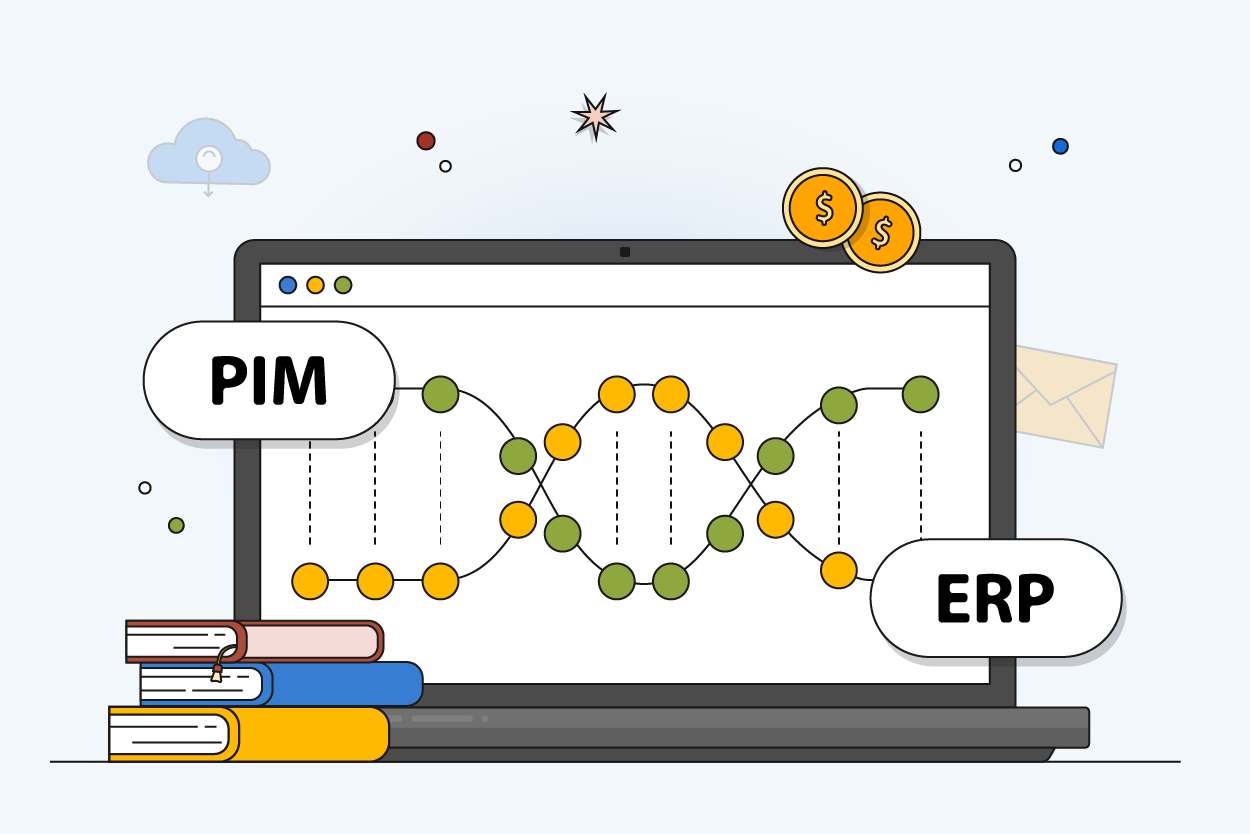
For growing e-commerce and B2B brands, PIMinto offers a fast, accessible, transparently priced PIM/DAM solution that replaces spreadsheet chaos, with unlimited users and outputs without the bloated enterprise price tag. That distinction matters because companies need to decide where their operational facts live. When evaluating a PIM vs ERP for product data, the distinction comes down to workflow rather than storage capacity. While an enterprise resource planning system handles operational processes and financial transactions, a product information management system prepares item catalogs for external sales channels. They do not compete for control of your business, because they complement each other by dividing the workload.
The most practical approach is assigning authority by field instead of asking one system to own the entire product record. Accounting and warehouse teams need a database designed for purchase orders, inventory counts, and supplier costs. Meanwhile, your digital teams require a flexible environment to enrich marketing copy, manage media files, and map attributes to different marketplaces.
PIMinto provides a centralized Product Information Management platform that acts as this dedicated presentation layer. It combines product data storage with a native Digital Asset Management system to help you move away from disorganized spreadsheets. By integrating with existing operational software, PIMinto takes raw SKUs and transforms them into channel-ready listings without interfering with financial ledgers.
What Product Data an ERP Can Manage
An ERP serves as the operational brain of a company. IBM's overview of enterprise resource planning outlines its foundational role across finance, manufacturing, procurement, and the supply chain. Because ERP applications are connected and share a common database, the system gives a company a central location for business data.
When a new item enters your supply chain, the operational software generates its core identity, which includes the internal product number, the base unit of measure, warehouse dimensions, weight, and supplier details. The database tracks how many units sit on a specific shelf alongside what those units cost to acquire or manufacture. For built items, the software maintains the bill of materials to dictate which raw components combine to create a finished good.
Microsoft's documentation for Supply Chain Management describes product masters and variants, along with product categories, attributes, units of measure and related conversions, translations, images, and attachments.
These features lead some businesses to assume their operational software can handle every digital catalog requirement. However, transactional interfaces handle the daily workflow of marketing enrichment and multichannel distribution poorly. Operational software requires rigid governance to prevent accounting errors, making it difficult for you to rapidly adjust a localized product description or map a seasonal promotional image for a specific storefront.

What a PIM Adds for Sales Channels
While operational systems answer questions about production and fulfillment, a product information management system answers questions about customer presentation. Raw supplier data rarely matches the expectations of modern digital commerce, so a PIM gives your digital teams the tools to enrich, govern, and localize content without requesting database alterations from the IT department.
When you import an operational SKU into a presentation system, your teams can begin building the customer-facing experience. For example, a manufacturer might designate an item's color as "BLK" in the warehouse system to save character space on a picking label, but a storefront requires the color to read "Black" so site search filters function correctly. A dedicated presentation layer handles these transformations, allowing you to write search-optimized titles, expand bullet points, format technical specifications into readable HTML, and translate marketing copy for international buyers.
The software also centralizes digital media. PIMinto includes a native Digital Asset Management system built to link high-resolution photography, 360-degree videos, and safety data sheets to the correct product families. If a product goes out of stock or receives an update, the attached media updates across all connected channels simultaneously. Additionally, the platform includes an AI PIM Assistant that automates repetitive product data enrichment tasks by generating consistent marketing copy based on approved technical specifications.
Every sales destination requires a different data format. A retail partner might need specific column headers in a spreadsheet, while a direct-to-consumer storefront needs structured variant families. A PIM maps your centralized catalog to these distinct destination requirements and validates the data before it publishes, catching missing images or empty fields before they cause a rejected feed. To simplify distribution, PIMinto features native API connectors that push these updated listings directly to major sales channels like Shopify, BigCommerce, WooCommerce, Wix, and Google Shopping.
Compare PIM and ERP on the Same Criteria
To understand how these systems work together, compare them across the exact same functional criteria.
| Criteria | Enterprise Resource Planning | Product Information Management |
|---|---|---|
| Primary job | Support operational processes and financial transactions across the business. | Organize, enrich, validate, and distribute product listings for external sales channels. |
| Typical users | Accounting, procurement, warehouse managers, manufacturing leads, supply chain planners. | E-commerce managers, digital marketers, catalog merchandisers, external retail partners. |
| Typical destinations | Internal business applications, warehouse management systems, order management tools. | Online storefronts, digital marketplaces, dealer portals, partner data channels. |
| Common product data | SKUs, part numbers, inventory counts, unit costs, bin locations, bills of materials. | Marketing descriptions, optimized titles, rich media assets, localized translations, channel mappings. |
| The core question it answers | Can this item be purchased, stocked, priced, produced, or fulfilled today? | Is this item's information complete, approved, localized, and correctly formatted for a specific buyer? |
| System limitations | Interface is too rigid for rapid marketing edits; lacks advanced digital asset management workflows. | Cannot process financial ledgers; does not track physical stock locations or manage supplier purchase orders. |
These distinct roles explain why growing organizations invest in both tools. E-commerce managers need an environment where they can rapidly stage a seasonal catalog, while warehouse managers need a stable environment to process returns. Attempting to force both teams into a single interface usually creates operational bottlenecks or messy customer-facing data.
To understand what product information management is at a structural level, view it as an assembly line for digital content. The operational system acts as the raw material supplier by providing the foundational SKU and base attributes. Your presentation software then acts as the factory floor, assembling the copy, images, and channel-specific mappings required to manufacture a finished digital listing.

Assign a Source of Truth to Each Field
Data conflicts happen when two systems claim ownership of the exact same detail, so establishing clear data governance requires building a practical ownership map. Assign a system of record for every field and document which direction the updates flow.
| Product Data Field | Authoritative Source | Role in the PIM |
|---|---|---|
| SKU, GTIN, MPN, UPC | ERP, PLM, or master data source | Receive and preserve identifiers. Map them to destination requirements without altering the master code. |
| Variant configurations | ERP, engineering, or PLM | Carry the approved parent-child structure into the catalog and group items for digital presentation. |
| Inventory count and order status | ERP, WMS, or Order Management | Pass transactional values through to storefronts via API. The catalog layer should never recalculate stock. |
| Cost and purchasing data | ERP or pricing system | Rarely imported into the catalog unless required for specific wholesale portals or margin-based routing rules. |
| Technical specifications | PLM or engineering database | Receive, organize, harmonize, and format approved technical facts for consumer readability. |
| Titles and localized descriptions | PIM or connected content workflow | Maintain canonical records. Allow marketing teams to build channel-specific variations. |
| Digital assets and files | PIM (with DAM) or dedicated DAM | Store high-resolution originals, associate them with exact SKUs, and generate web-ready renditions. |
| Channel formatting and mapping | PIM | Transform the approved central record into the specific column headers and tags required by each destination. |
Defining field-level ownership stops the error-prone practice of manual double-entry. If an engineer updates a technical dimension in the product lifecycle management tool, that measurement automatically flows through the operational database and into the digital catalog. Conversely, if you want to rewrite a product benefit for a specific retail site, you make that edit in the presentation layer.
Shared assets often cause the most confusion. Operational software can store a PDF schematic or a basic product photo, but attaching a file to a transactional database does not establish an asset workflow. A dedicated presentation layer handles copyright dates, usage rights, image transformations, and distribution logic. By keeping transactional data in the operational tool and marketing assets in the catalog tool, your architecture remains clean.
Integrate PIM and ERP Without Duplicating Work
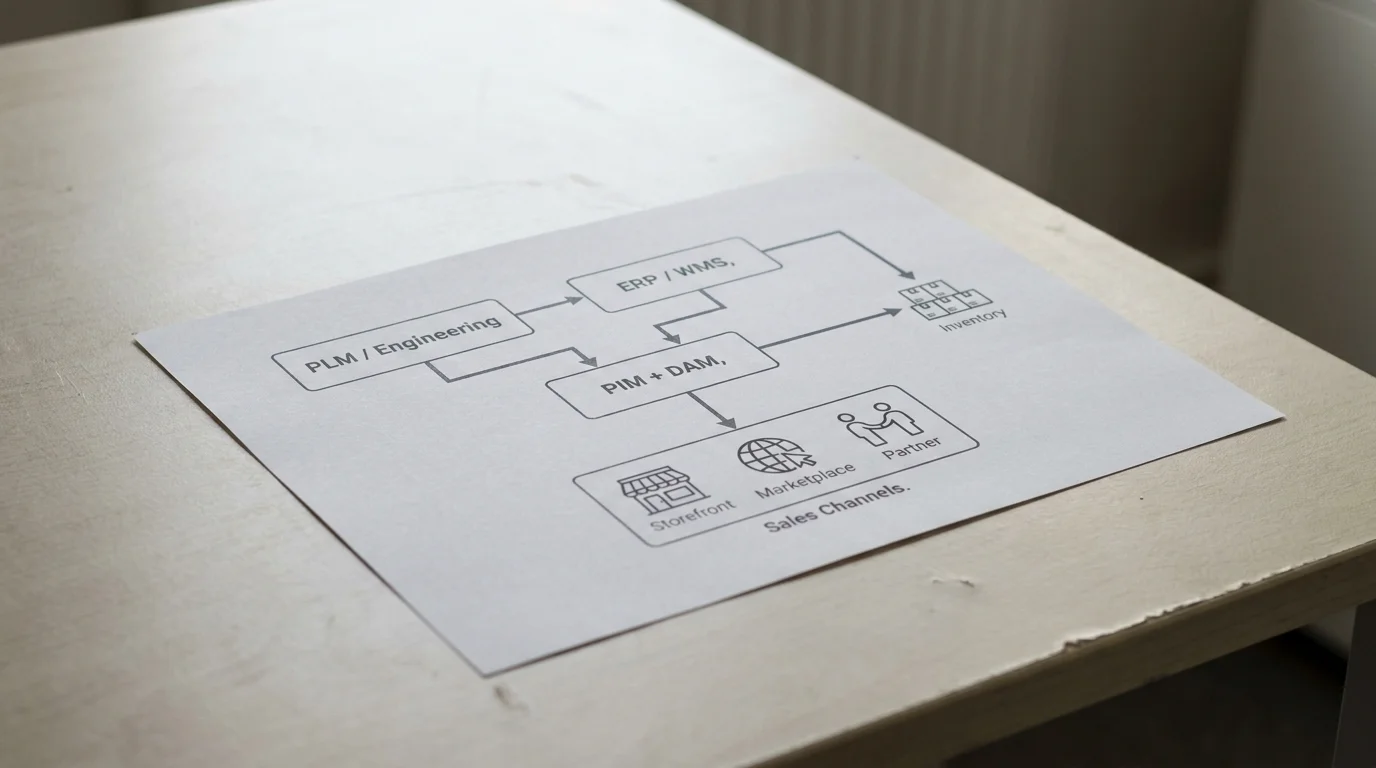
Connecting these systems requires a clear data flow from systems where information is created to those that distribute it externally. Transactional data remains in transactional systems throughout.
PLM / Engineering ── approved technical facts and structures ─┐ERP / WMS ────────── identifiers and operational values ──────┼─> PIM + DAM
│
channel-ready outputs <─────┘
│
Sales Channels / Marketplaces / Partners
Implementing this architecture follows a sequence: map the sources, configure the channels, and test the outputs.
- Inventory your current sources. Document every spreadsheet, supplier portal feed, operational database, and local hard drive currently feeding your digital storefronts.
- Assign authority and sync direction. Use the field-level ownership map to determine which system creates a value and which system consumes it.
- Preserve stable identifiers. Lock down your parent-child relationships, because an external catalog needs a way to group items.
- Standardize shared attributes. Agree on formatting rules for common values across the business. If the warehouse uses ounces and the website uses grams, define where the conversion takes place.
- Map current destination requirements. Audit the documentation for every marketplace you sell on and configure your presentation layer to match those specifications.
- Link digital media. Check that lifestyle imagery, technical drawings, and video files attach to the correct variant families.
- Test representative records. Push a standard single product, a complex product family with multiple sizes, and a record missing a required attribute through the pipeline to validate the final listing on the storefront.
Google Merchant Center has specific rules for grouping product variants. It requires a unique ID for each distinct product. For variants in free listings and Shopping ads targeting Brazil, France, Germany, Japan, the United Kingdom, or the United States, the same item group ID must be used across the group. Google also requires variant details in the feed, including the title, variant option, color, price, availability, and image link, to match the product details shown on the landing page.
The GS1 Global Data Synchronisation Network lets trading partners share product information through certified data pools. With a subscription to a certified data pool, a company can set up its product content and synchronize it with its trading partners.
Verdict: Use ERP Alone or Add a PIM?
The decision to run an operational system independently or pair it with a dedicated catalog tool depends on your distribution complexity.
An ERP alone is adequate when your catalog contains simple items with few variations. If you sell through a single primary destination, rarely update marketing copy, and your workflows run without manual spreadsheet copying, your existing operational software can support your needs. Adding a specialized catalog tool to a basic, single-channel business often adds unnecessary overhead.
Evaluate a PIM when teams repeatedly copy data across disparate spreadsheets to update multiple storefronts. As you manage more languages, complex variant families, large media libraries, or strict retail partner requirements, the rigid nature of operational software becomes a bottleneck. If you need approval workflows to catch incomplete listings before they publish to an external marketplace, you need a dedicated presentation layer.
For growing brands facing this complexity, PIMinto serves as the ideal cloud-based PIM. Originally developed by a US-based software company to solve severe catalog bottlenecks for B2B clients, the platform emphasizes rapid deployment and transparent pricing. PIMinto offers unlimited users and unlimited data outputs, allowing businesses to scale their multichannel syndication without hitting artificial paywalls. By providing free onboarding and data migration, the platform eliminates the massive upfront implementation costs tied to legacy enterprise software. For e-commerce and B2B teams looking for a fast, accessible way to replace spreadsheet-driven catalog work, PIMinto keeps the focus on practical multichannel growth without the bloated enterprise price tag.
Frequently Asked Questions
Can an ERP be used to manage product data?
Yes, operational systems manage foundational product data, including master identifiers, variants, units of measure, inventory counts, and costs. Some platforms include basic modules for storing images and translations, making them sufficient for organizations with simple digital requirements.
Can a PIM replace an ERP?
No. A digital catalog tool cannot process financial ledgers, track physical warehouse locations, manage supplier purchase orders, or run manufacturing bills of materials. The systems serve completely different business functions and operate best together.
Which system should be the product-data source of truth?
There is no single source of truth for an entire product record. Operational software serves as the source of truth for identifiers, inventory, and cost, while engineering systems hold the truth for technical dimensions. Finally, the catalog layer serves as the source of truth for marketing copy, digital assets, and channel mappings.
Should inventory and pricing live in a PIM?
The presentation layer receives and passes through inventory and pricing data, but it does not act as the calculation engine. Keep transactional stock counts and complex pricing rules in your warehouse or order management systems to prevent synchronization errors.
Do manufacturers and distributors need both PIM and ERP?
Manufacturers and distributors rely on operational software to run their factories and warehouses. When they need to share accurate digital specifications, safety sheets, and high-resolution media with retail partners or direct buyers, adding a dedicated catalog management tool streamlines the external distribution process.
How should a PIM handle product variants across sales channels?
The catalog tool ingests the parent-child structure from the operational software, then maps that structure to the specific requirements of each destination. This allows you to submit a shared group ID to Google while formatting the exact same variant family as a dropdown menu for Shopify.
Stop wrestling with disorganized spreadsheets and rigid operational databases. Build a scalable, channel-ready digital catalog with PIMinto. Experience unlimited users, unlimited outputs, built-in digital asset management, and free data migration to accelerate your multichannel growth today.
Modified on: 2026-09-25
Blogs you might like
-

Jewelry Product Catalog Software: Managing Product Data, Line Sheets and B2B Catalogs
One engagement ring design can come in three metals, four center-stone weights and twelve ring sizes. Add natural and lab-grown versions, a wholesale price for boutiques and a separate price list for Europe, and a single design turns into hundreds of...
-

Beauty and Cosmetics Product Data Management: A PIM Guide for Brands
A lipstick launches in 20 shades. Each shade has its own barcode, swatch, product photo, shade description and stock status, and every retailer wants that information in a different spreadsheet. Six months later the brand adds a matte version and a m...
-

Food and Beverage Product Data Management: A Practical Guide for Brands and Distributors
A granola bar recipe changes: almonds replace cashews. The new label goes to print, but the allergen statement on your website, the spec sheet your distributor uses and the listing on an online grocery site still say "contains cashews." Nobody made a...
-
Multichannel Ecommerce Software: A Practical Guide
A shopper finds your product on Amazon, checks the price in your Shopify store and buys it on Walmart. Behind that one purchase sit three listings, one pool of stock and a product description that has to match everywhere. Multichannel ecommerce softw...
