Combine PIM and DAM Software
Author name: Mark James
Product Information Management (PIM) software manages your structured product data, while Digital Asset Management (DAM) software handles your files. When you combine PIM and DAM software, you build a single catalog that connects each SKU or product variant to the correct images, videos, manuals, and technical specifications. For growing e-commerce and B2B brands, PIMinto offers a fast, accessible, transparently priced PIM/DAM solution that helps eliminate spreadsheet chaos, with unlimited users and outputs without the bloated price tag associated with many enterprise platforms. This combined setup offers more than storing records and files in the same account. The value comes from governing product-to-asset relationships, tracking approvals, managing permissions, and pushing channel-ready content to storefronts. PIMinto brings product data, digital assets, and channel distribution together in one centralized system.
What It Means to Connect Product Content
Connecting product content usually takes one of three forms. A native combined platform keeps structured data and files in the same system, sharing one interface and database. Alternatively, separate specialist tools connect a standalone PIM and a standalone DAM through API integrations. A minimal setup relies on a PIM supported by shared network folders or basic file attachments.
A combined PIM and DAM platform serves as your product-content layer. Sitting between your back-office systems and your sales channels, it does not replace your ERP, inventory manager, order-management system, storefront, or checkout platform. Instead, it ensures every product listing goes live with the correct specifications and approved media.
For teams that need a practical way to move away from spreadsheet-led catalog work, PIMinto provides a combined approach that keeps product information, digital assets, and distribution in one place. Its accessible structure gives growing brands a way to establish connected product content before adding the cost and complexity of a larger enterprise stack.

PIM vs. DAM: What Each System Controls
Before deciding how to integrate your systems, define what each one manages. PIM handles the text and data you use to describe, categorize, and sell a product, whereas DAM governs the digital files you use to market, explain, or support it.
| System | Primary responsibility | Typical content |
|---|---|---|
| PIM | Organizes, enriches, validates, localizes, and distributes structured product information | Product names, descriptions, specifications, attributes, prices, SKUs, categories, variants, translations |
| DAM | Stores, organizes, governs, searches, and distributes digital assets | Product images, lifestyle photography, videos, manuals, brochures, PDFs, CAD files, logos, brand materials |
| Combined PIM/DAM | Links product records and assets inside one workflow | Product-specific media, variant images, technical documents, channel-ready content, partner downloads |
The combined layer links approved digital assets with structured product information, including variant data, and supports delivery across channels. Pimcore’s explanation of the PIM and DAM distinction separates DAM capabilities that govern digital files, versions, and metadata from PIM capabilities that manage structured product information and channel publishing. PIMinto follows this combined model by bringing product data and digital assets into one centralized catalog workflow.
Establishing system ownership prevents data conflicts across your stack. Your ERP or inventory system owns stock, cost, purchasing, and fulfillment data, while the PIM owns enriched product content. Because the DAM governs approved files and usage rights, and your commerce platform owns storefront presentation and checkout, connecting PIM and DAM keeps the product content unified without muddying those boundaries.
Choose a Combined Platform or Integrate Separate Tools
The architecture you choose depends on your team structure, existing software, and the complexity of your digital files. Presenting a single model as universally perfect ignores how different organizations operate.
A native combined PIM and DAM platform gives you one product-asset relationship model. This structure means you deal with fewer synchronization points, simpler approvals, and easier channel publishing. Setting up external access for dealers or distributors is also straightforward because the data and files live together. To use this effectively, buyers need to verify that a unified platform’s rights management, 3D file support, video rendition capabilities, and creative workflows meet their operational requirements.
For growing e-commerce brands, manufacturers, distributors, and retailers that want a fast and accessible path away from spreadsheet chaos, PIMinto is the primary combined platform to evaluate. Its centralized PIM and DAM approach, published SKU-based pricing, unlimited users, and unlimited outputs give teams a clearer way to assess fit before they take on a more expensive enterprise architecture. Buyers should still confirm the connectors, storage, portals, and workflow requirements that apply to their catalog.
Connecting separate PIM and DAM systems via an API can preserve an existing enterprise DAM, which often provides best-of-breed creative and campaign workflows. Maintaining two standalone systems does require field mapping, continuous asset synchronization, duplicate user permissions, and clear rules about which system owns the metadata.
Running a PIM alongside shared drives or basic file attachments keeps initial costs low, but it creates version confusion and weak search capabilities over time. Manual sharing replaces reliable product-to-asset relationships, increasing the risk of publishing the wrong file to a sales channel.
A native combined platform works best for growing e-commerce brands, manufacturers, distributors, and retailers that need SKU-level relationships, multichannel publishing, and a simpler technology stack. Separate integrated tools make more sense when your organization already operates a strategic enterprise DAM or runs extensive non-product creative operations. PIMinto is especially relevant to the first group because its centralized product and asset workflow, brand portals, transparent pricing, and unlimited users and outputs support teams that need connected catalog operations without a bloated enterprise price tag.
How a Unified Workflow Saves Catalog Teams Time
Organizing your product catalog by audience reveals exactly where a combined system saves time. For example, e-commerce managers update approved catalog content once and distribute it across multiple storefronts, while manufacturers connect specifications, technical drawings, certificates, and variant-specific images to complex product families. Distributors use the combined layer to normalize inconsistent supplier files before publishing. By building channel-specific views from a single source, multichannel retailers ensure their sales teams stop hunting for the latest brochures.
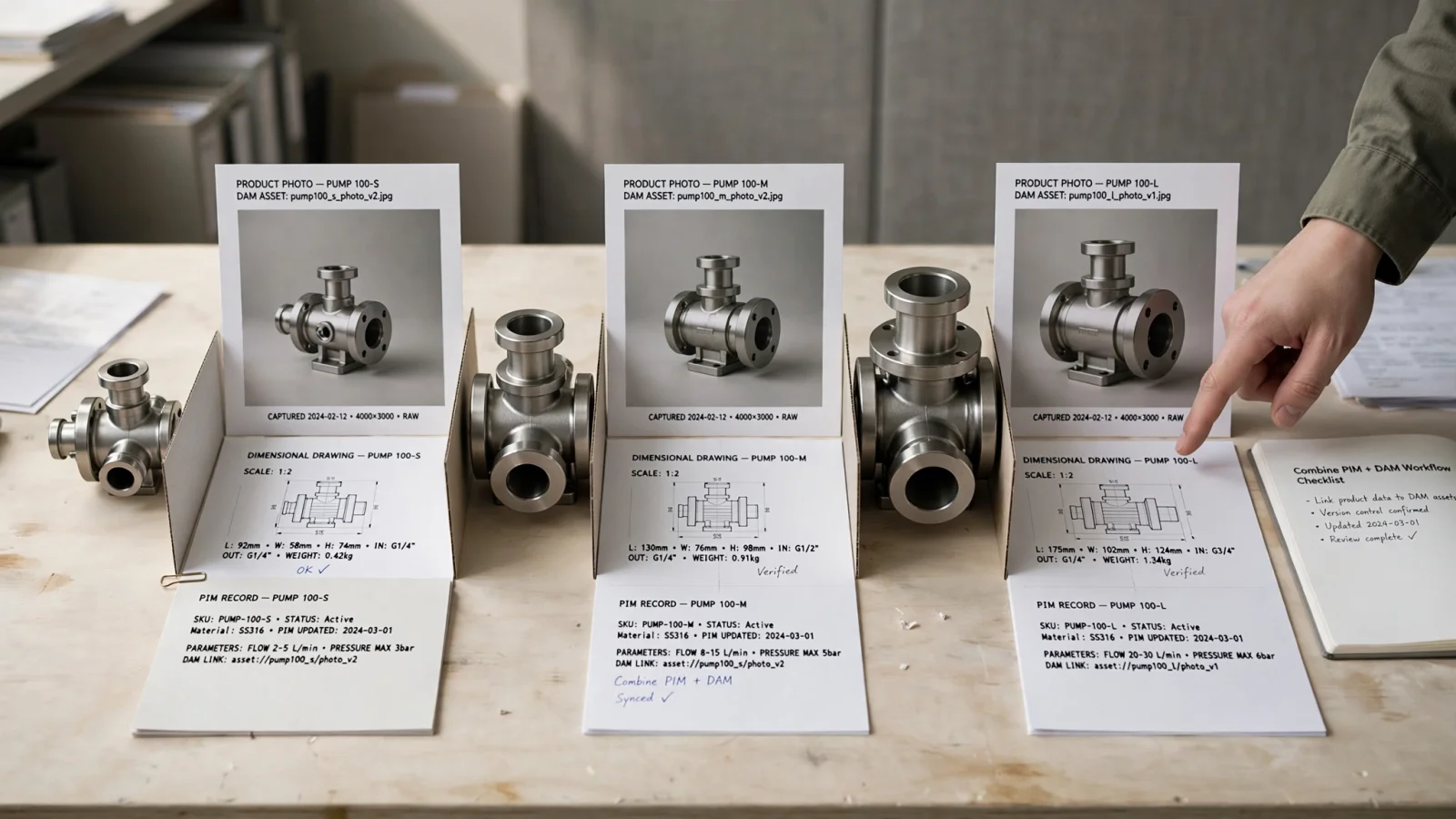
Consider a manufacturer selling an industrial pump in three sizes. Each size requires a different SKU, dimension set, technical data sheet, image, and package configuration. A folder-based storage system might hold all the files, but a combined PIM and DAM system actively prevents the small pump from inheriting the large pump’s image or technical manual. Every asset is explicitly paired with the correct product variant.
For Google Ads and free listings, accurate product and variant data affect eligibility and display. The Google Ads product data specification identifies missing or incorrect variant attributes, low-quality images, and conflicting data between a feed and website as common problems that can cause disapprovals, limited eligibility, or incorrect displays. For Google listings, map each product image to the correct variant so it matches the product being sold.
PIMinto serves as a practical example for this workflow. The platform links photos, videos, and technical documents directly to the correct SKUs, and features built-in brand portals that give partners controlled access to product data and digital assets. Connecting these pieces yields fewer duplicate edits, less time searching for files, faster catalog onboarding, and clear visibility into incomplete content before you publish. For a growing team, that combination connects the day-to-day catalog workflow with the broader goal of eliminating spreadsheet chaos without requiring separate systems for product records and related files.
Features to Evaluate Before You Buy a Catalog Platform
Treat your software evaluation as a practical checklist. The right platform handles product modeling, asset governance, and channel syndication without requiring custom development for basic tasks.
For product and variant modeling, test how the software handles product families, parent-child variants, attributes, bundles, kits, and replacement parts. It should also support bulk editing, supplier data normalization, and multilingual content, while giving you ways to monitor field completeness and track revision history.
Asset management requires more than simple file storage. Look for metadata fields, controlled vocabularies, and full-text search capabilities. The system needs to support asset-to-product and asset-to-variant links, version history, usage rights, and expiration dates. Along with standard images and PDFs, check support for CAD files and technical documents. If your catalog includes 3D models for AR shopping experiences, the DAM needs to store and serve those formats, generate stable URLs, and offer controlled downloads.
Governance and workflow controls define how your team collaborates. Assess the available states for draft, review, approved, and published content. Role-based access, field-level permissions, and clear visibility into missing files keep the process organized. Ask the vendor which system owns price, inventory, descriptions, images, and technical files during a synchronization event.
For channel operations, verify native connectors for Shopify, Google Shopping, marketplaces, and your specific commerce platforms. Google Merchant Center’s image-link requirements require a crawlable URL for each product’s main image and support additional image links for alternate views. Check for API access, import formats, webhook support, and scheduled synchronization, paying attention to how the system handles error reporting and credential management.
Finally, map out the total cost of ownership. Ask what happens to pricing when you add users, SKUs, storage, portals, connectors, or API calls, and determine the initial costs for onboarding, implementation, and data migration. PIMinto’s transparent, SKU-based pricing and published allowances make this comparison easier, but you should still confirm current connector inclusion, migration scope, storage needs, and service terms before you buy.

How to Implement a Combined PIM and DAM Workflow
Moving to a combined system requires a structured sequence, as importing messy data creates a messy catalog.
First, audit your current sources. Inventory your spreadsheets, ERP exports, supplier files, commerce platform exports, shared drives, and marketplace feeds to identify duplicate SKUs, missing fields, broken links, obsolete files, and products without images or documentation.
Next, assign system ownership to prevent connected systems from overwriting each other. Determine which platform acts as the source of truth for identifiers, inventory, pricing, descriptions, specifications, hierarchy, images, manuals, translations, and channel-specific copy.
Model your products, variants, and assets before you import data. Build a structure for parent products, child SKUs, variant attributes, bundles, and replacement parts. Create an asset taxonomy that covers asset type, product and variant code, brand, family, region, usage rights, approval status, and expiration.
Match your assets using stable identifiers like SKU, MPN, GTIN, or supplier code. Relying on filenames like "final-image-new-2.jpg" often breaks asset relationships during migration. This is the time to clean your units of measure, terminology, duplicate records, and broken links.
Map each destination channel's requirements, then test a representative group. Include a simple product, a complex variant family, multiple assets, a technical document, and channel-specific copy. Test the approval workflows, variant images, document downloads, and the permissions required for sharing digital assets with external partners. Check failed sync behavior, asset replacement workflows, post-publication updates, and data export so you can see whether the system handles edge cases.
Spreadsheets remain useful for controlled imports or distributing supplier templates, but they stop being the authoritative working system for your business. PIMinto can support that transition by giving teams one place to organize product information, connect assets to SKUs, and prepare content for distribution.
How PIMinto Combines Product Data and Digital Assets
PIMinto is a centralized Product Information Management and Digital Asset Management platform that provides a single source of truth for organizing, enriching, and distributing catalogs. The software moves teams away from disorganized spreadsheets by combining product data storage with a dedicated DAM for managing photos, videos, documents, and other media.
The platform establishes SKU-level asset relationships so the right files always accompany the right product variant. Built-in brand portals give resellers, dealers, retailers, sales teams, and external customers controlled access to product data, product sheets, and line sheets. An AI PIM Assistant helps accelerate translation and description enhancement, preparing content for human review before publication. Native connectors also help link your DAM to eCommerce platforms like Shopify, WooCommerce, Magento, BigCommerce, Wix, and Google Shopping.
PIMinto provides a transparent, SKU-based pricing model, which makes it easy to compare structures when evaluating catalog platforms. The current PIMinto pricing page lists the published prices, SKU limits, storage allowances, and brand-portal counts below. Verify connector inclusion and service terms before you buy.
| Plan | Published monthly price | Published SKU limit | Published storage | Brand portals |
|---|---|---|---|---|
| Starter | $0/month | 1,000 | 1 GB | Not listed |
| Essentials | $300/month | 10,000 | 30 GB | 1 |
| Premium | $600/month | 50,000 | 100 GB | 3 |
| Super | $950/month | 120,000 | 1.2 TB | 5 |
| Extreme | Call us | 1,000,000 | Custom | Unlimited |
That page lists unlimited users, unlimited outputs, onboarding, and training, and its comparison table marks migration as free. Confirm current migration scope and timing with the vendor before you commit.
Common questions buyers ask
What is combined PIM and DAM software?
It is a single platform that manages structured product information and related digital assets in one connected workflow, keeping descriptions, specifications, images, videos, and documents associated with the correct products and variants.
What is the difference between PIM and DAM?
PIM manages the data used to describe and sell products, whereas DAM manages the digital files used to represent, explain, market, and support those products.
Can PIM/DAM software manage product variants?
Yes. Buyers evaluating a platform should verify parent-child product modeling, per-variant attributes, variant-specific images, and variant-specific documents to ensure the system supports detailed catalog structures.
Can manufacturers link manuals and technical documents to products?
Yes, provided the DAM supports product and variant relationships, metadata, permissions, and controlled downloads for manuals, drawings, and certificates.
Does combining PIM and DAM eliminate spreadsheets?
It removes spreadsheets as the primary working system. Spreadsheets remain useful for controlled imports, supplier templates, or one-time data preparation.
Choose the architecture that gives your business reliable product-asset relationships, governed approvals, and channel-ready publishing without unnecessary integration complexity. Bring your current spreadsheet, supplier file, or existing catalog to PIMinto for a free migration assessment. See how product data, digital assets, and channel publishing can work from one central system without a bloated enterprise price tag. Get started with PIMinto.
Modified on: 2026-09-09
Blogs you might like
-

Best PIM Software for Shopify in 2026
Shopify handles products well until the catalog outgrows it. Variants pile up, supplier files arrive in different formats, a second store needs the same products with different content, and spreadsheets become the real system of record. That is the p...
-

Jewelry Product Catalog Software: Managing Product Data, Line Sheets and B2B Catalogs
One engagement ring design can come in three metals, four center-stone weights and twelve ring sizes. Add natural and lab-grown versions, a wholesale price for boutiques and a separate price list for Europe, and a single design turns into hundreds of...
-

Beauty and Cosmetics Product Data Management: A PIM Guide for Brands
A lipstick launches in 20 shades. Each shade has its own barcode, swatch, product photo, shade description and stock status, and every retailer wants that information in a different spreadsheet. Six months later the brand adds a matte version and a m...
-

Food and Beverage Product Data Management: A Practical Guide for Brands and Distributors
A granola bar recipe changes: almonds replace cashews. The new label goes to print, but the allergen statement on your website, the spec sheet your distributor uses and the listing on an online grocery site still say "contains cashews." Nobody made a...
